Shopify Customisation to Notes
Automatically extract order note details, line item SKU/title information, and usable customization properties from Shopify order XML into Linnworks order notes. Add Despatch Date as an order extended property when missing.
Overview
Shopify Customisation to Notes is an automated XML data extraction solution for Linnworks. It reads selected Shopify order XML records and copies useful order notes, line item details, and customisation properties into a readable Linnworks order note.
Shopify XML can contain important fulfilment information such as personalised text, engraving details, product options, and other line item properties. Without automation, warehouse and fulfilment teams may need to inspect the XML manually to find these values.
The macro also checks whether the order already contains a Despatch Date extended property. When the property is missing and the order has a Despatch By Date, the macro creates the extended property automatically.
Orders already containing a note created by this macro are skipped to prevent duplicate extracted notes.
Keep Shopify order notes and customisation details visible in Linnworks while reducing manual XML checks during fulfilment.
Who Should Use Shopify Customisation to Notes
Warehouse & Fulfilment Teams
Teams responsible for picking, production, packing, and dispatch can view Shopify customisation details directly from the Linnworks order notes.
Personalisation Teams
Teams processing engraved, printed, personalised, or customised products can access relevant customer selections without manually opening the order XML.
Integration Administrators
Administrators configure the macro, enable it for the Rule Engine, define suitable order conditions, and monitor execution logs.
Operations & Customer Service Teams
Operations and customer service teams benefit from clearer access to order notes, line item information, and Shopify customisation values.
Key Features
Shopify XML Note Extraction
Reads the XML order note and includes it when the value matches the expected order number format.
Line Item Identification
Adds each qualifying line item's SKU and title to the generated Linnworks order note.
Customisation Property Extraction
Extracts usable line item property names and values from Shopify order XML.
Despatch Date Creation
Adds a Despatch Date order extended property when it is missing and a Despatch By Date is available.
Duplicate Processing Prevention
Skips orders already containing a note created by Add Note From ShopifyXMLDataExtract macro.
Property Filtering
Excludes image-upload, Customily, hidden, empty, and system-related property values from the generated note.
How Shopify Customisation to Notes Works
Shopify Customisation to Notes runs through a defined sequence every time it processes one or more selected orders. The macro is triggered through the Linnworks Rule Engine and receives the relevant order IDs automatically.
Step 1: Order retrieval
The macro reads each order ID supplied through the OrderIds parameter and retrieves the corresponding Linnworks order details.
Step 2: Despatch Date validation
The macro checks whether the order already contains a Despatch Date extended property.
Step 3: Despatch Date creation
If the property is missing and the order has a Despatch By Date, the macro creates the Despatch Date order extended property using the format yyyy MMM dd.
Step 4: Duplicate-processing check
Existing order notes are checked for a note created by Add Note From ShopifyXMLDataExtract macro. Previously processed orders are skipped.
Step 5: XML retrieval and parsing
The macro retrieves all available XML records attached to the order and parses each record where possible.
Step 6: Order note extraction
The XML order note is checked and included only when it matches the expected order number pattern.
Step 7: Line item processing
Each LineItem node is read, and the SKU and title are added to the generated note.
Step 8: Property filtering
Line item properties are evaluated, and empty, image-upload, Customily, hidden, and system-style values are excluded.
Step 9: Order note creation
When at least one line item contains a Properties node, the macro creates a new non-internal Linnworks order note containing the extracted details.
Step 10: Existing note handling
Previous order notes are marked as internal, except where an existing note matches the extracted XML order note.
Configure the Macro
Once the app is installed, you need to create a macro configuration so the system knows which macro to run and allows it to be selected in the Rule Engine.
This setup can be adjusted anytime based on your operational requirements.
Steps to Configure
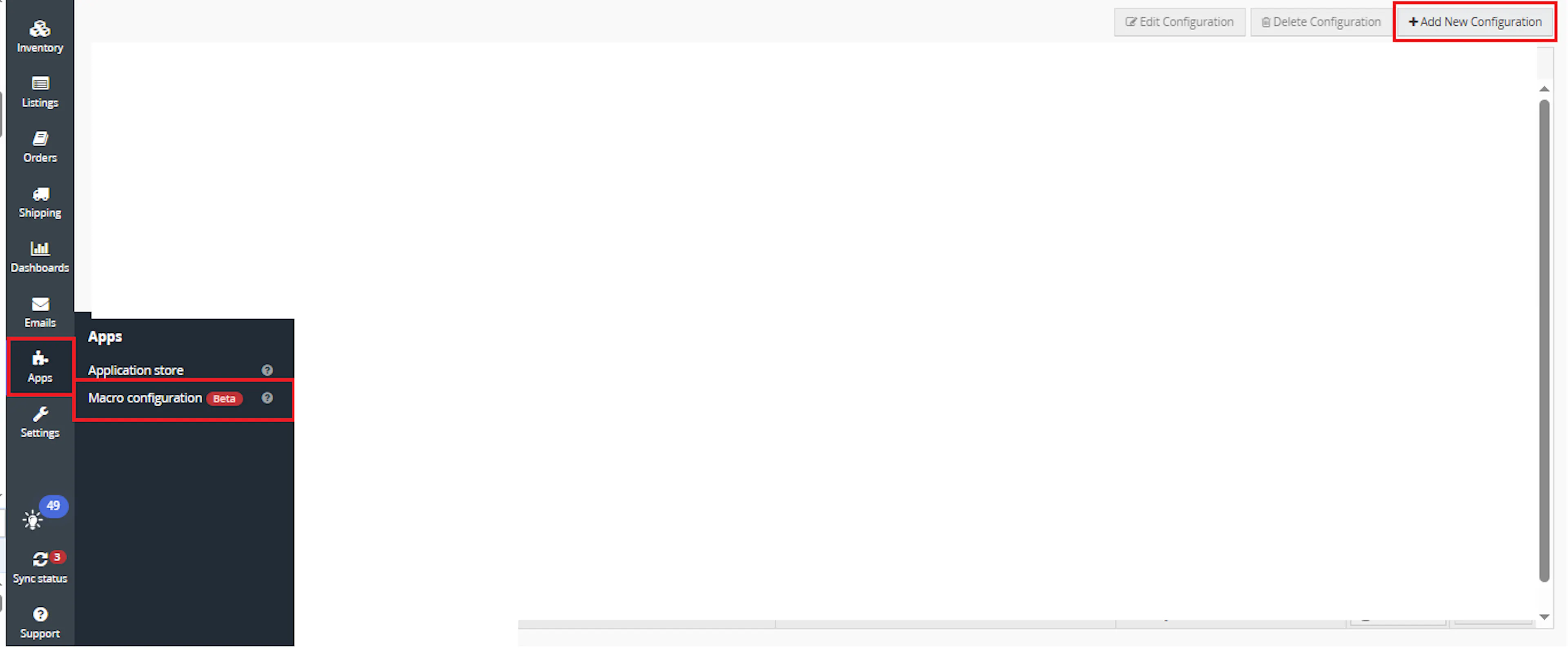
Go to Apps > Macro Configuration and click + Add new configuration.
Select the ShopifyCustomisationToNotes macro and click Create Configuration.
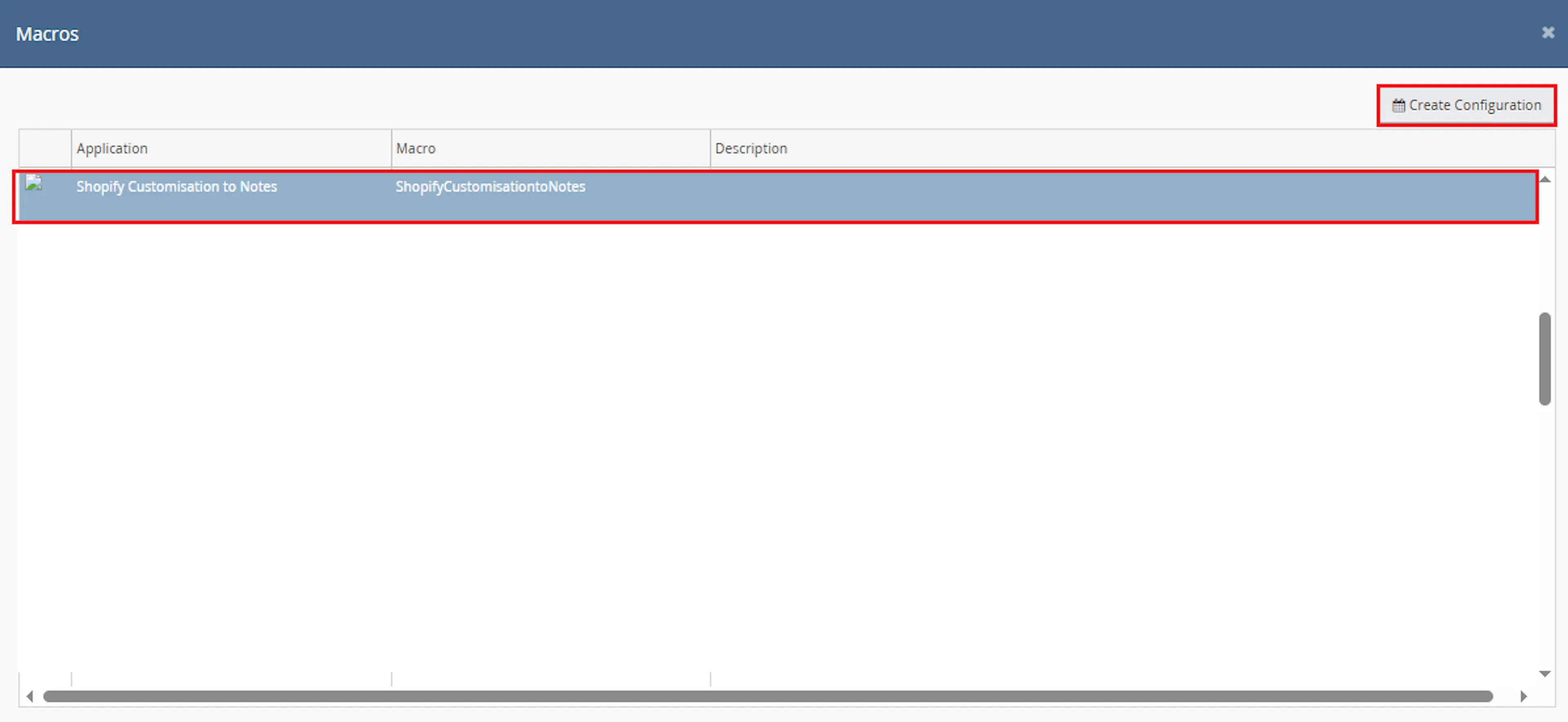
This creates a new configuration where the macro can be enabled and used by the Rule Engine.
In the Macro Configuration screen, add the configuration name.
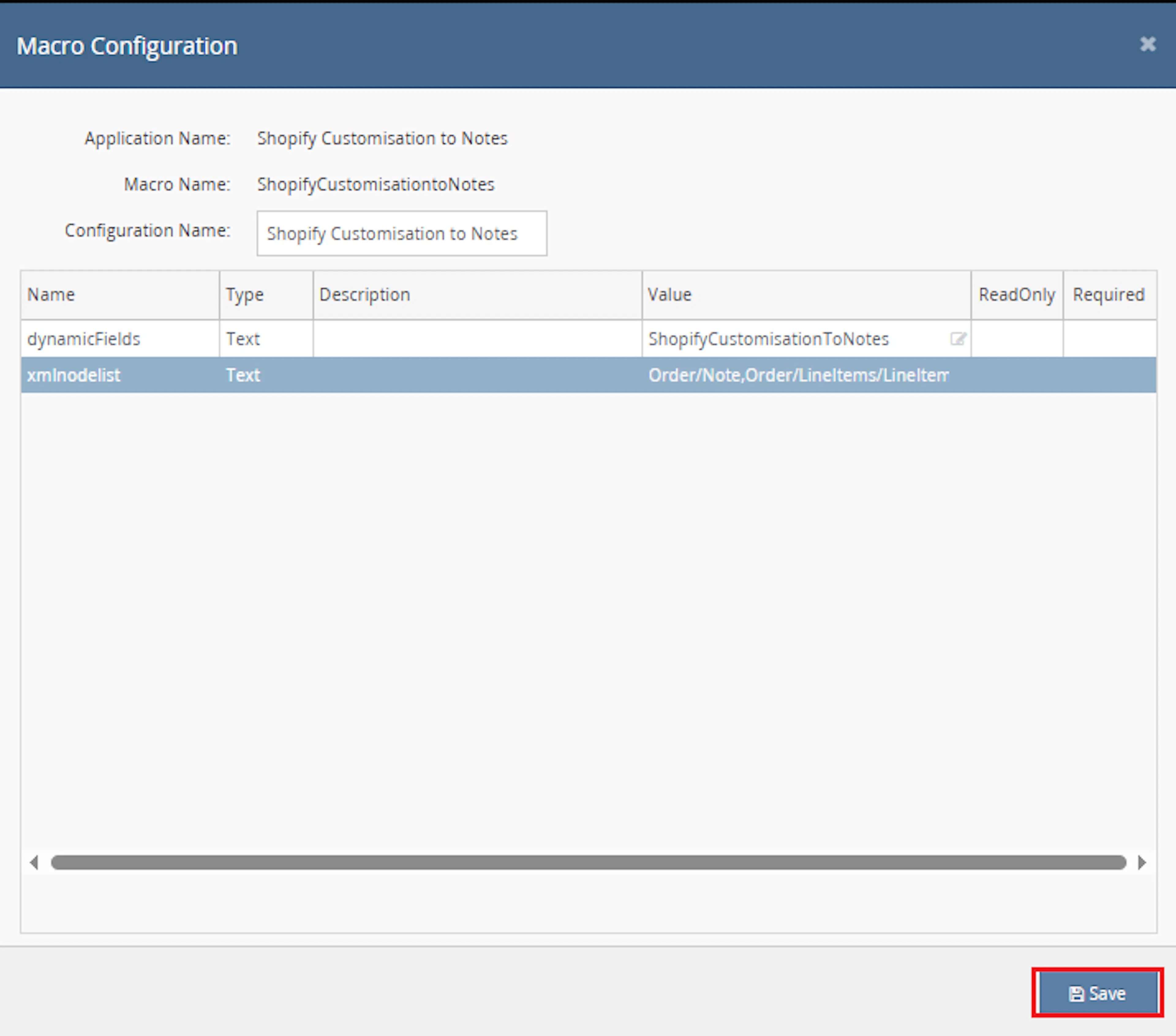
This macro uses the selected order IDs provided by the Rule Engine.
The following parameters are available in the macro signature:
- xmlnodelist
- dynamicFields
In the current macro logic, xmlnodelist and dynamicFields are not used. The macro processes the selected order IDs passed by the Rule Engine.
Make sure to enable the macro to continue with the Rule Engine configuration.

Note: If the macro is not enabled, it will not appear in the Action value list when setting up the rule.
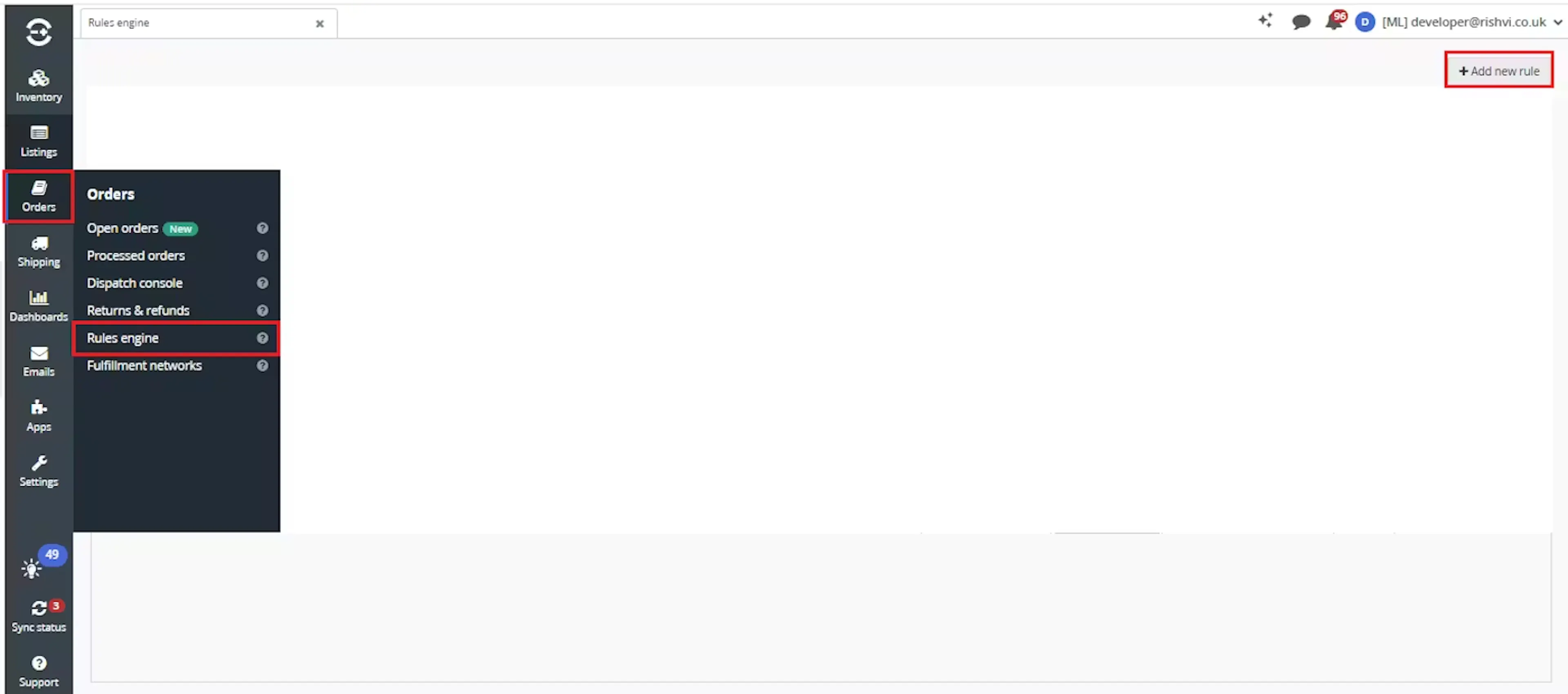
Go to Orders > Rules engine and click + Add new rule.
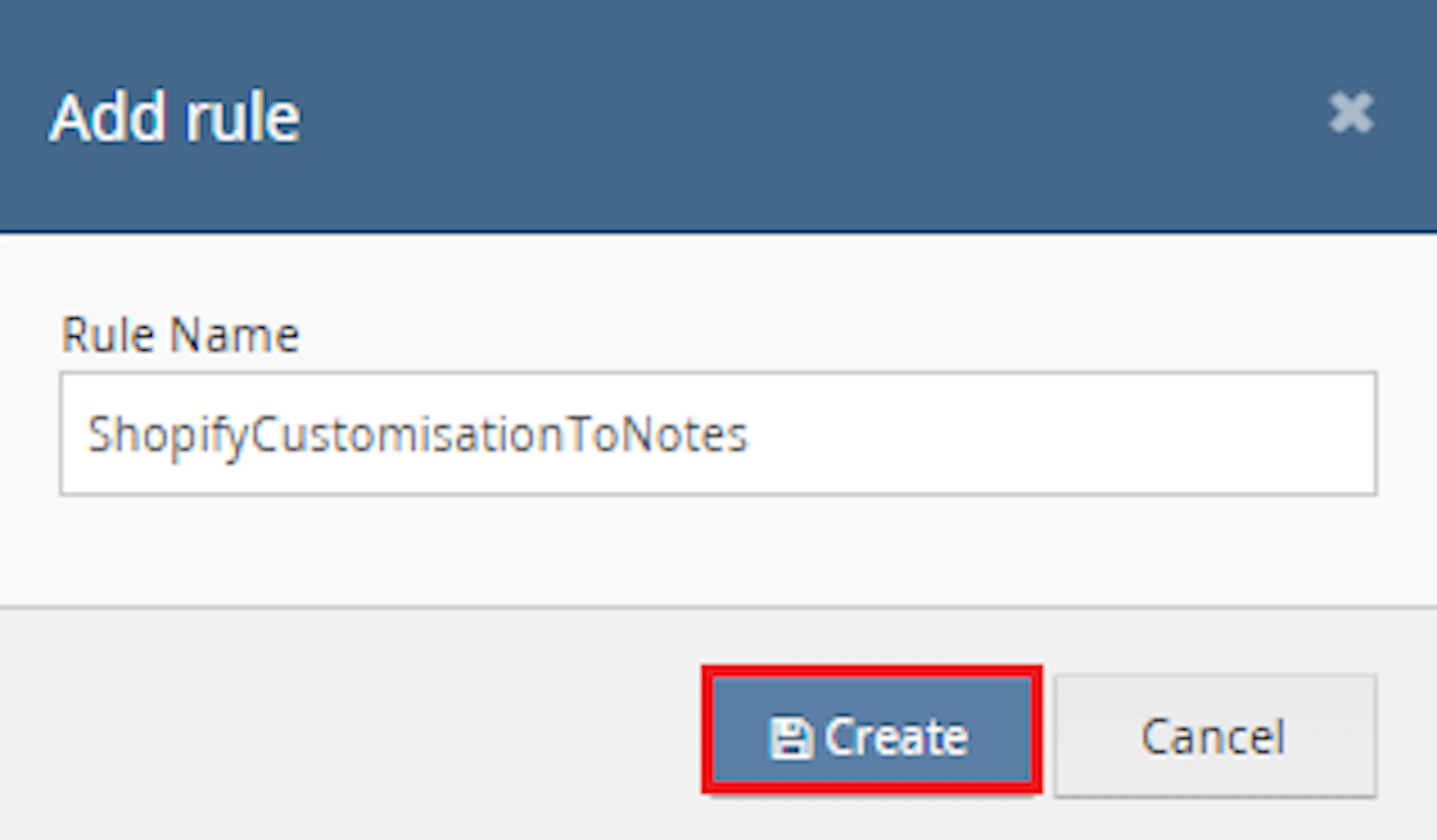
Enter the rule name and click Create.
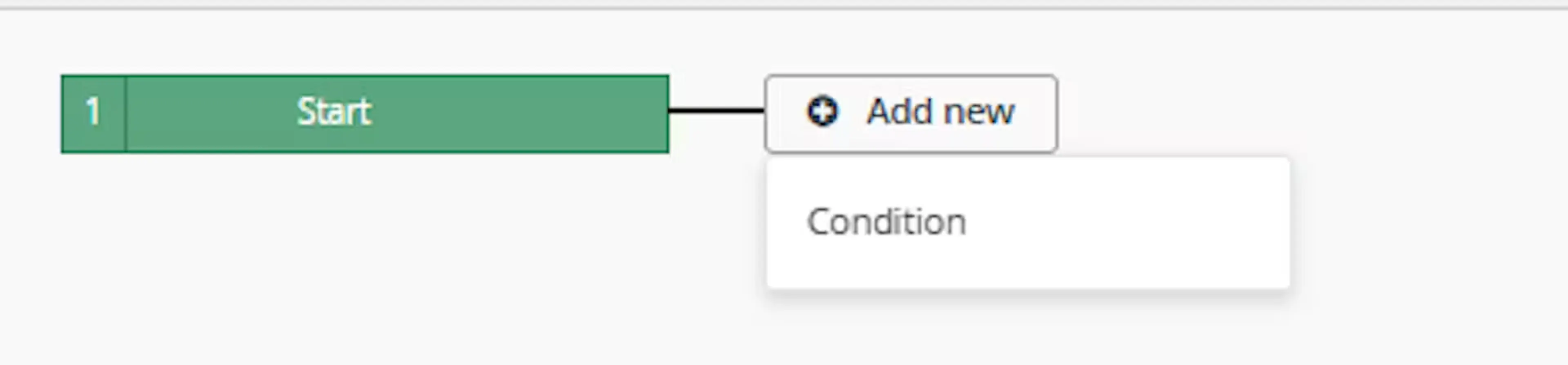
Click Add new, select Condition, set the condition as required, and save it.
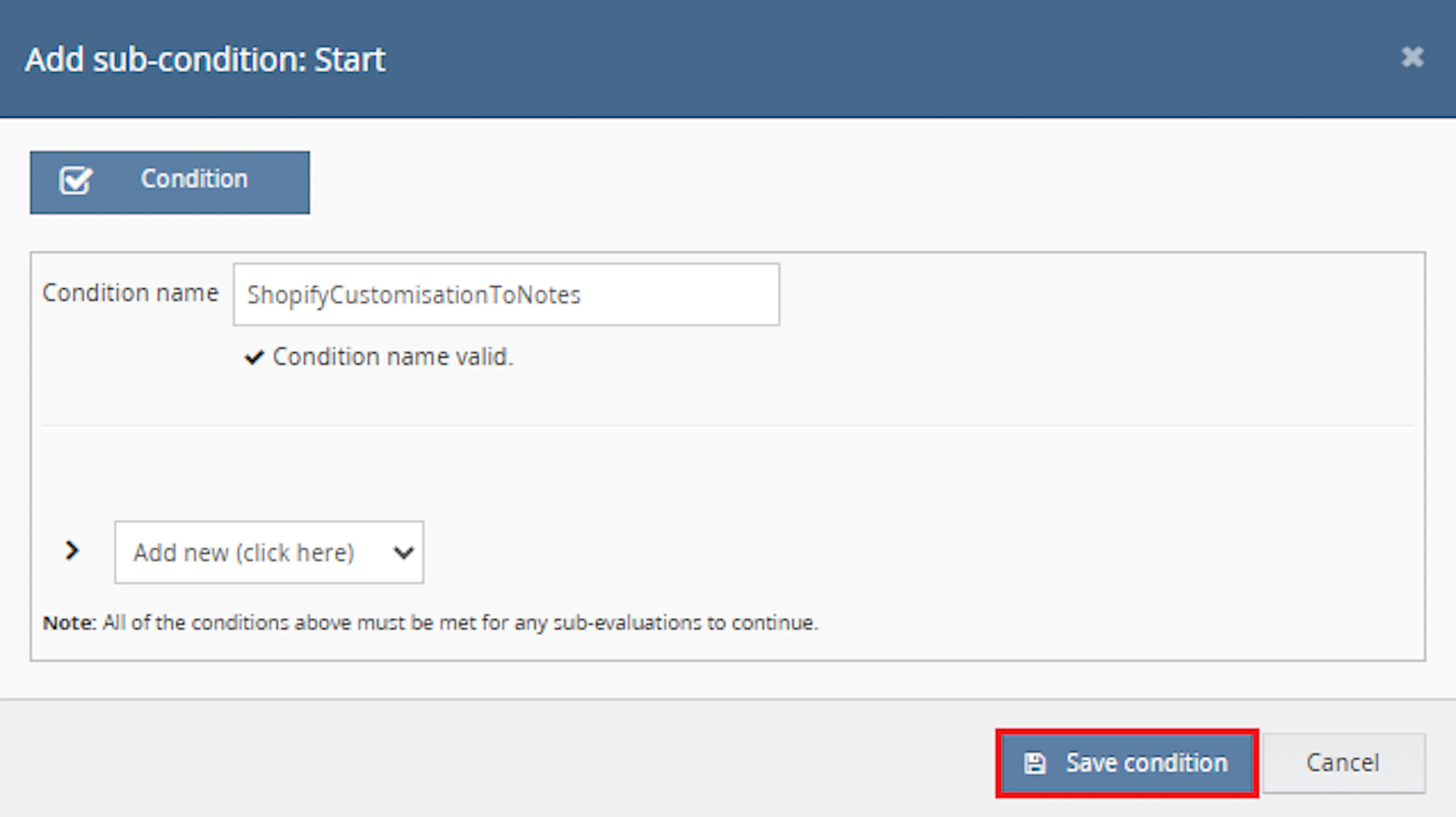
Choose the condition that identifies the Shopify orders where XML customization details should be extracted into the order notes.
Add the macro action and click Save.
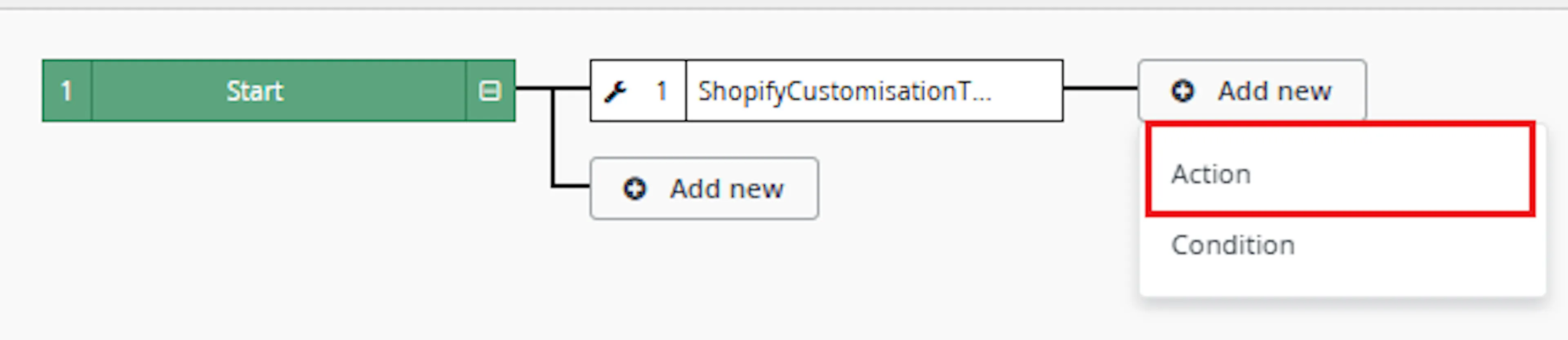
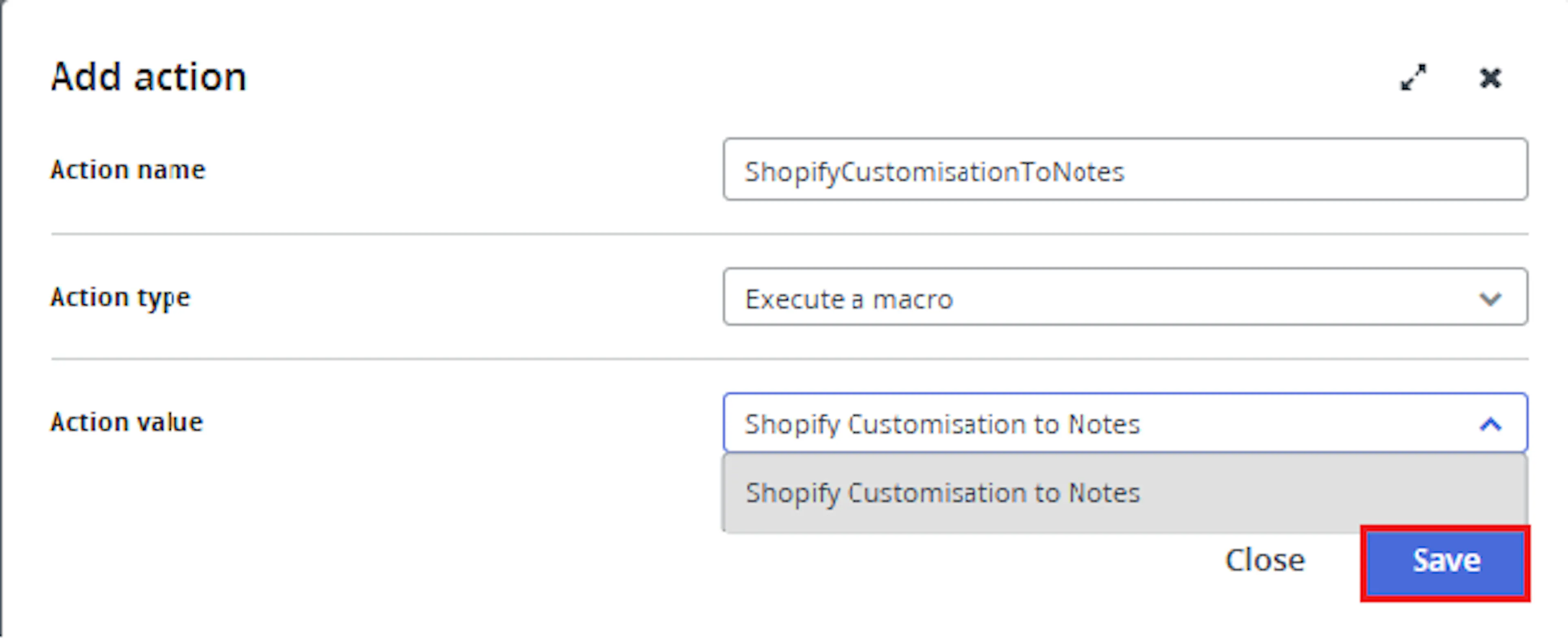
In the Add action window, enter the Action name, for example:
ShopifyCustomizationToNotes
-
Set Action type to:
Execute a macro -
In Action value, select:
Shopify Customization To Notes -
Click Save
Note: If the macro is not enabled, it will not appear in the Action value list when setting up the rule.
Review the saved rule setup.
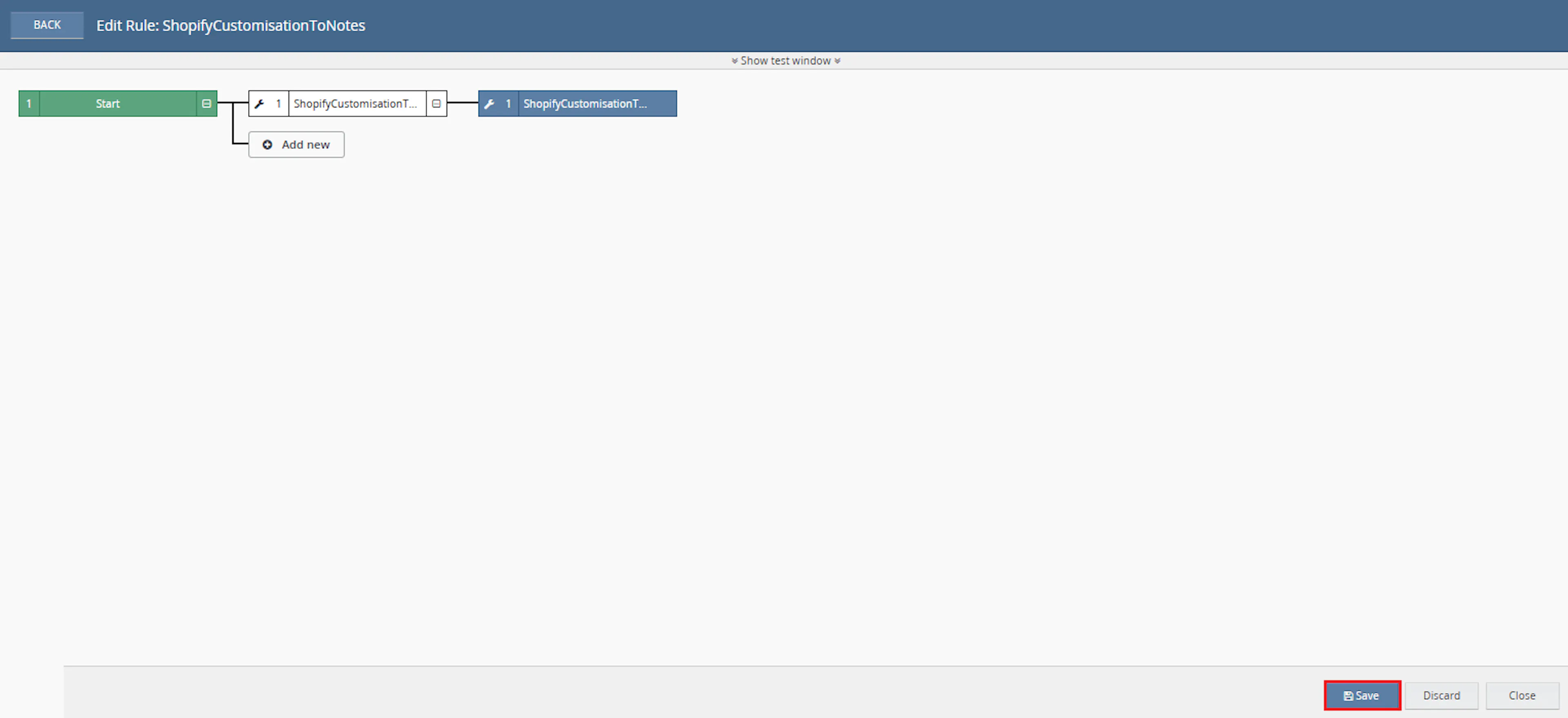
- Verify the condition and action are connected correctly
- Click Save in the bottom-right corner to save the rule
Key Benefits
Manually inspecting Shopify order XML can slow down fulfilment and increase the chance of missing important product customisation details. Shopify Customisation to Notes makes this information directly available within the Linnworks order.
Reduce manual XML checks, improve customisation visibility, and make important Shopify order details easier to access during fulfilment.
Reduce Manual XML Checks
Removes the need to manually inspect Shopify XML to find qualifying order notes and line item properties.
Improve Customisation Visibility
Adds useful customisation details directly to the Linnworks order notes.
Support Accurate Fulfilment
Makes personalised text and other qualifying product options easier for fulfilment teams to locate.
Add Despatch Date Automatically
Creates the Despatch Date extended property when it is missing and the order contains a Despatch By Date.
Avoid Duplicate Notes
Skips orders that already contain a note created by this macro.
Keep Notes Focused
Filters image-upload, Customily, hidden, empty, and system-related property values from the final note.
Usage of App
Shopify Customisation to Notes is triggered through the Linnworks Rule Engine to extract Shopify XML details into order notes automatically.
Execution
Trigger via Rule Engine
Call the Shopify Customization To Notes macro through the Rule Engine with the required OrderIds. The xmlnodelist and dynamicFields parameters are present in the macro signature but are not used by the current logic.
Outcome
When the macro runs against an order, it:
Checks Despatch Date
Determines whether the order already contains a Despatch Date extended property and creates it when required.
Checks previous processing
Reviews existing order notes to determine whether the macro has already processed the order.
Reads Shopify XML
Retrieves and parses the XML records associated with the selected Linnworks order.
Extracts qualifying order details
Reads the matching XML order note, line item SKUs, titles, and usable property values.
Filters unwanted properties
Removes empty, image-upload, Customily, hidden, and system-style values from the extracted content.
Creates a Linnworks order note
Saves the extracted details as a non-internal note created by Add Note From ShopifyXMLDataExtract macro.
Input Parameters
Shopify Customisation to Notes contains the following parameters:
| Parameter | Required | Used by Current Logic | Description |
|---|---|---|---|
| OrderIds | Yes | Yes | The Linnworks order IDs to process. Passed through the Rule Engine. |
| xmlnodelist | Present | No | Exists in the macro signature but is not used in the current logic. |
| dynamicFields | Present | No | Exists in the macro signature but is not used in the current logic. |
The following behaviour is built into the macro:
| Setting | Description |
|---|---|
| Processed note creator | Add Note From ShopifyXMLDataExtract macro |
| Generated note visibility | The newly created extracted note is saved with Internal = false. |
| Despatch Date format | The extended property is formatted as yyyy MMM dd. |
| Line item search path | The macro searches using //Order/LineItems/LineItem. |
| Order note creation condition | A generated note is created only when at least one line item contains a Properties node. |
| Existing note handling | Previous notes are marked internal unless a note matches the extracted XML order note. |
Property Values Skipped by the Macro
The macro excludes a property when its value is empty or its name starts with one of the following values:
| Excluded Property Prefix |
|---|
_customily |
_Image Upload |
_customily-production-url |
**IMPORTANT |
_Upload Image |
_has_gpo |
Image |
Photo Upload |
This filtering helps keep the final Linnworks order note focused on usable fulfilment and customisation information.
Extracted Note Format
When valid XML data is found, the macro builds the note using the following structure:
| Content | Format |
|---|---|
| XML order note | Included when it matches the expected order number pattern |
| Line item | SKU - Title |
| Customisation property | Name: Value |
For example, when the XML contains:
| XML Value | Example |
|---|---|
| Order Note | 206-4618037-1259539 |
| SKU | CUSTOM-MUG-001 |
| Title | Personalised Mug |
| Property | Name: John |
| Property | Message: Happy Birthday |
The created Linnworks order note contains the order note, line item identification, and qualifying property values in a readable format.
Best Practices
Use targeted Rule Engine conditions and verify sample Shopify XML structures before enabling the macro across a large order volume.
Target relevant Shopify orders
Configure Rule Engine conditions so only Shopify orders that may contain useful XML customisation data are processed.
Validate sample XML
Confirm that sample orders contain Order, LineItems, LineItem, and Properties nodes before enabling the macro widely.
Review extracted notes
Test several orders and confirm that the generated notes include the expected SKU, title, and customisation values.
Review filtered properties
Confirm that the built-in excluded prefixes match your operational requirements.
Check Despatch Date values
Verify that the generated Despatch Date extended property is formatted correctly for downstream workflows.
Monitor Rule Engine execution
Review logs for already processed orders, XML parsing failures, missing line items, and successful note creation.
FAQ
How is Shopify Customisation to Notes triggered?
The macro is triggered through the Linnworks Rule Engine. Matching order IDs are supplied automatically through the OrderIds parameter.
Does the macro require custom configuration values?
The xmlnodelist and dynamicFields parameters exist in the macro signature but are not used by the current logic. The macro processes the order IDs supplied through the Rule Engine.
What information does the macro extract?
The macro can extract a qualifying XML order note, line item SKUs, line item titles, and usable customisation property names and values.
Does the macro process all XML records?
Yes. The documented behaviour reads and parses each available XML record attached to the order.
When is the XML order note included?
The XML order note is included only when it matches the expected order number pattern.
How are line items displayed in the generated note?
Each line item is added using the format SKU - Title.
How are customisation properties displayed?
Qualifying properties are added using the format Name: Value.
Are all Shopify properties included?
No. Empty values and properties beginning with excluded image-upload, Customily, hidden, and system-style prefixes are skipped.
When is an extracted note created?
A note is created only when at least one line item contains a Properties node.
Is the generated order note internal?
No. The newly generated extracted note is saved with Internal = false.
How does the macro prevent duplicate notes?
It checks whether an existing order note was created by Add Note From ShopifyXMLDataExtract macro. If found, the order is skipped.
What happens to existing order notes?
Existing notes are marked as internal, except where an existing note matches the extracted XML order note.
When is Despatch Date added?
The macro adds the Despatch Date extended property when it is missing and the order has a Despatch By Date.
What format is used for Despatch Date?
The value is formatted as yyyy MMM dd.
What happens if the XML cannot be parsed?
The parsing error is logged, and the macro continues processing where possible.
What happens when there are no LineItem nodes?
No line item details can be extracted from that XML structure.
What happens when no line item has Properties?
The macro does not create the extracted order note.
Legal Information
- Privacy Policy: https://rishvi.co.uk/privacy-policy/
- Terms and Conditions: https://rishvi.co.uk/terms-conditions/
Please review these pages to understand how data is handled and the terms governing the use of this application.
Summary
Shopify Customisation to Notes automates the extraction of useful Shopify XML information into Linnworks order notes.
Once connected to the Rule Engine, the macro checks Despatch Date, prevents duplicate processing, reads the order XML, extracts qualifying order notes and line item customisation details, filters unwanted properties, and creates a readable non-internal order note.
Automated XML extraction
Shopify order notes, line item details, and qualifying customisation values are extracted automatically.
Improved fulfilment visibility
Important product customisation information is made available directly within the Linnworks order.
Automatic Despatch Date handling
Missing Despatch Date extended properties are created from the order Despatch By Date where available.
Duplicate processing prevention
Orders already containing a note created by this macro are skipped.
For orders that do not produce the expected note, review the Rule Engine and macro logs, confirm that the order has valid XML, and verify that at least one line item contains a Properties node with qualifying values.