Packaging Selection by Location
Automatically select the correct packaging group for selected Linnworks orders based on fulfilment location and recalculate order packaging details.
Overview
Packaging Selection by Location is an automated packaging-management solution for Linnworks. It selects the appropriate packaging group for each qualifying order based on the order's fulfilment location.
The macro processes order IDs supplied through the Linnworks Rule Engine. For each selected order, it identifies the assigned fulfilment location, matches that location to a packaging category defined within the macro, and retrieves the corresponding packaging group from Linnworks.
When a matching packaging group is available, the macro uses the first packaging type in that group, recalculates the order's packaging dimensions and weight, and applies the updated packaging calculation to the order.
Orders without a matching location rule or packaging group are left unchanged.
Keep packaging selection consistent by automatically applying the correct packaging group based on each order's fulfilment location.
Who Should Use Packaging Selection by Location
Warehouse & Fulfilment Teams
Teams preparing orders for picking, packing, label generation, and dispatch can reduce manual packaging selection.
Logistics Teams
Logistics teams can ensure packaging calculations are aligned with the fulfilment location used for each order.
Integration Administrators
Administrators configure the macro, enable it for the Rule Engine, maintain fulfilment locations and packaging groups, and monitor execution logs.
Operations Teams
Operations teams benefit from consistent packaging rules and more accurate shipping preparation across multiple locations.
Key Features
Location-Based Packaging Selection
Selects a packaging category based on the fulfilment location assigned to each selected order.
Packaging Group Matching
Matches the selected packaging category to an existing packaging group in Linnworks.
Automatic Packaging Type Selection
Uses the first packaging type available within the matched packaging group.
Packaging Recalculation
Recalculates the order packaging depth, height, width, and weight.
Automatic Order Update
Applies the recalculated packaging information back to the selected Linnworks order.
Execution Logging
Logs the order number, fulfilment location, selected category, packaging dimensions, weight, errors, and completion.
How Packaging Selection by Location Works
Packaging Selection by Location follows a defined sequence whenever it receives one or more order IDs from the Linnworks Rule Engine.
Step 1: Retrieve packaging groups
The macro retrieves the packaging groups currently available in Linnworks.
Step 2: Retrieve stock locations
It retrieves the available Linnworks stock locations used to identify each order's fulfilment location.
Step 3: Read selected order IDs
The macro loops through each order ID supplied through the OrderIds parameter.
Step 4: Retrieve the order
For each selected order, the macro retrieves the Linnworks order details.
Step 5: Identify the fulfilment location
The order's FulfilmentLocationId is used to identify the matching Linnworks stock location.
Step 6: Select the packaging category
The fulfilment location is compared against the location rules defined within the macro.
Step 7: Find the packaging group
The macro searches the available Linnworks packaging groups for the selected packaging category.
Step 8: Select the packaging type
When a matching group is found, the first available packaging type in that group is selected.
Step 9: Recalculate packaging
Linnworks packaging calculation is used to recalculate the order's depth, height, width, and weight.
Step 10: Update the order
The recalculated packaging information is submitted back to Linnworks using the selected packaging group and packaging type.
Configure the Macro
Once the app is installed, you need to create a macro configuration so the system knows which macro to run when the rule is triggered.
This setup can be adjusted anytime based on your operational requirements.
Steps to Configure
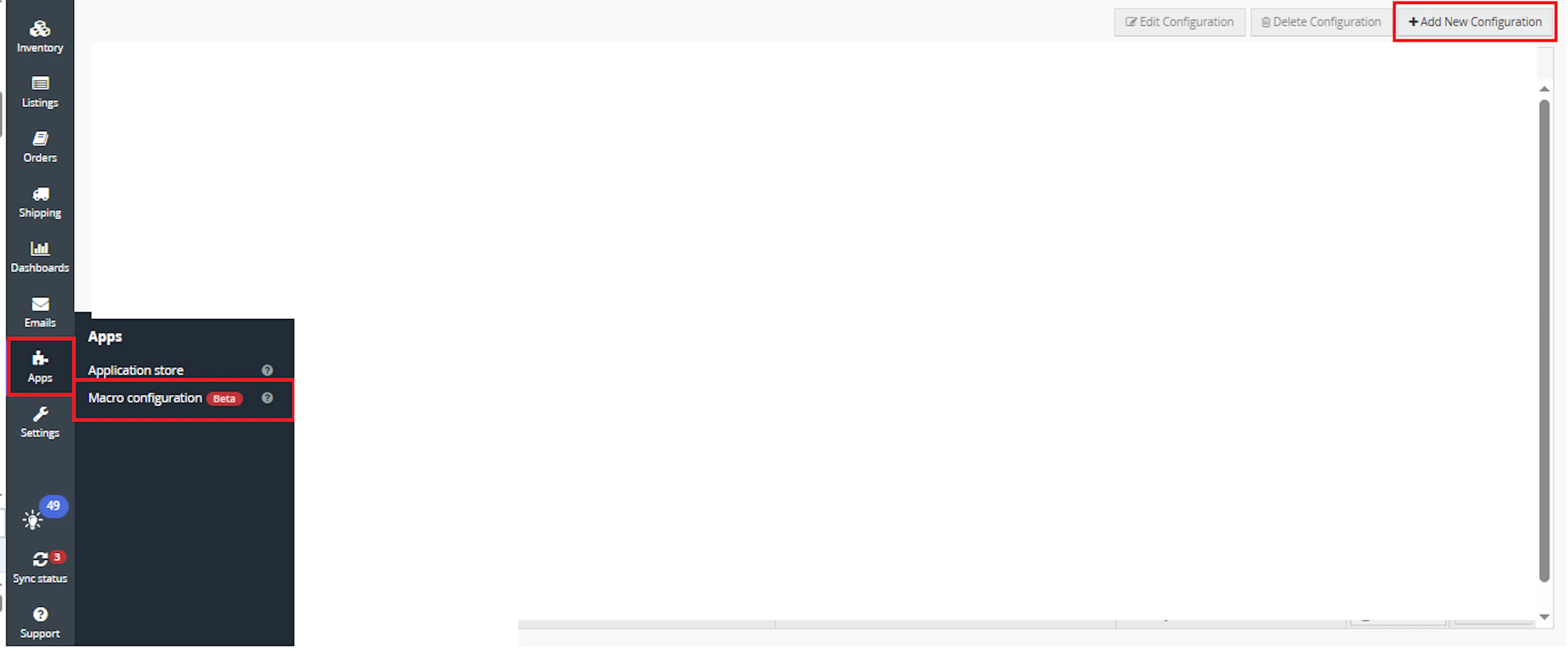
Go to Apps > Macro Configuration and click + Add new configuration.
Select the PackagingSelectionByLocationRulesEngine macro and click Create Configuration
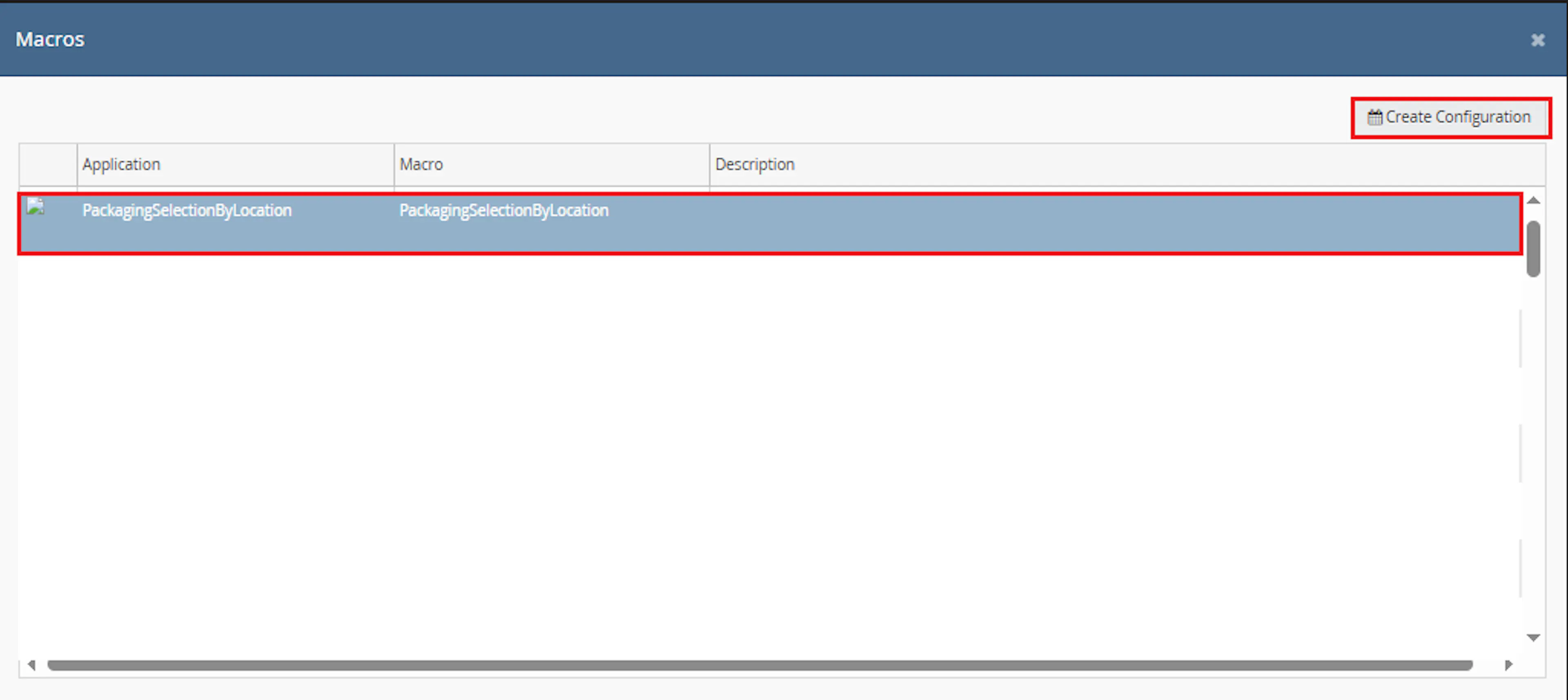
This creates a new configuration where the selected order IDs are passed to the macro when it runs from the rule.
In the Macro Configuration screen, add the configuration name.
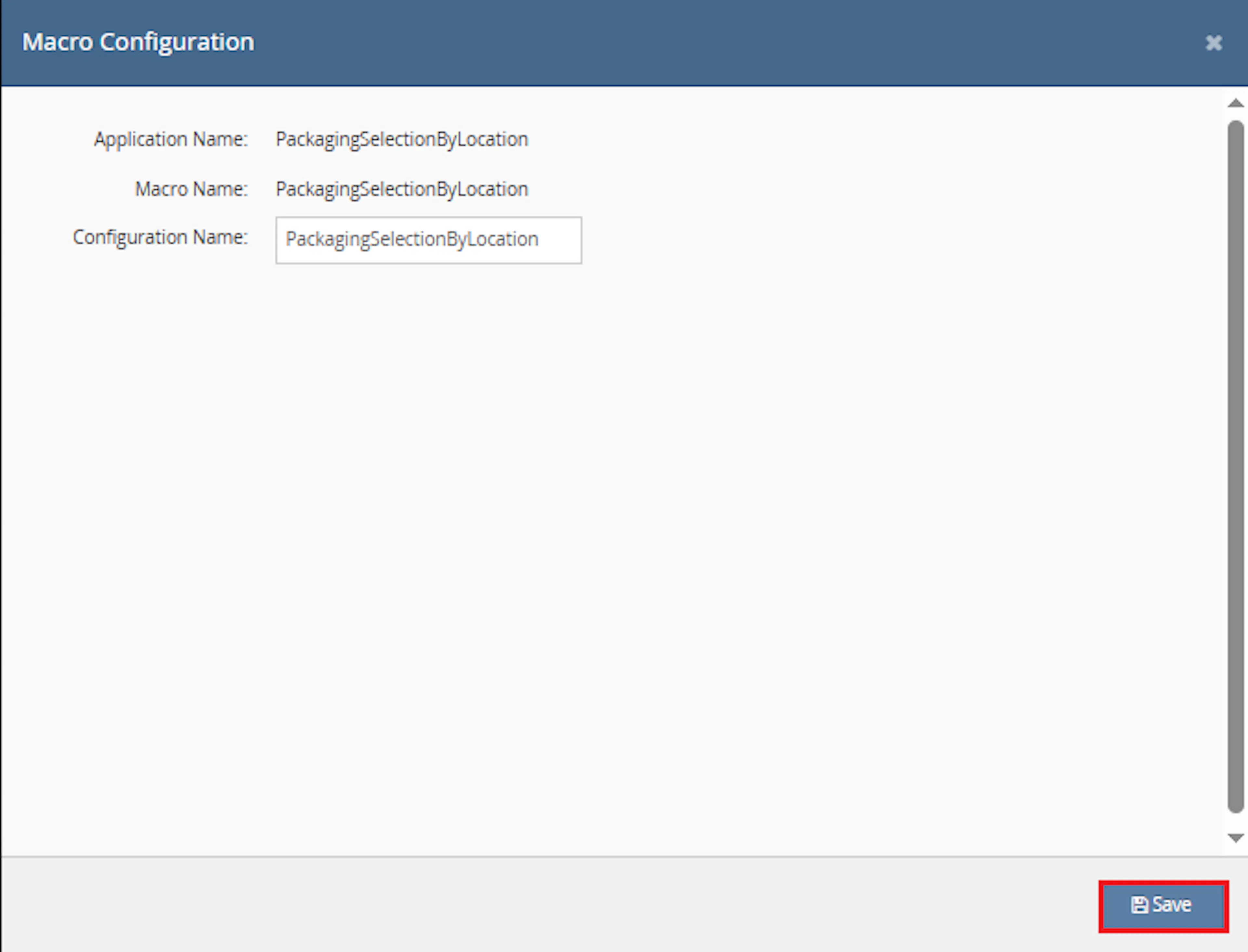
Example configuration name:
Packaging Selection by Location
This macro does not require additional user-entered parameter values. The OrderIds value is provided automatically by the selected orders or rule context.
Make sure to enable the macro to continue with the Rule Engine configuration.

Note: If the macro is not enabled, it will not appear in the Action value list when setting up the rule.
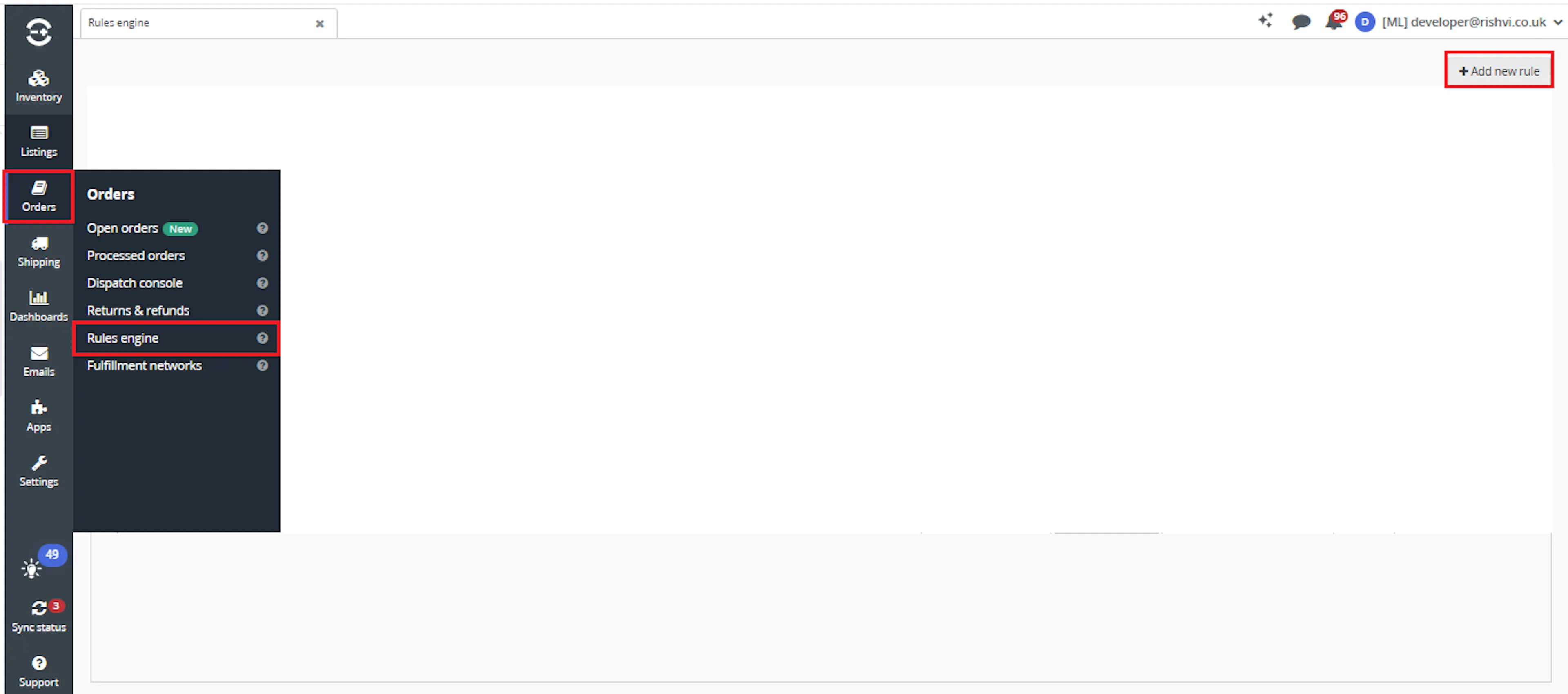
Go to Orders > Rules engine and click + Add new rule.
Key Benefits
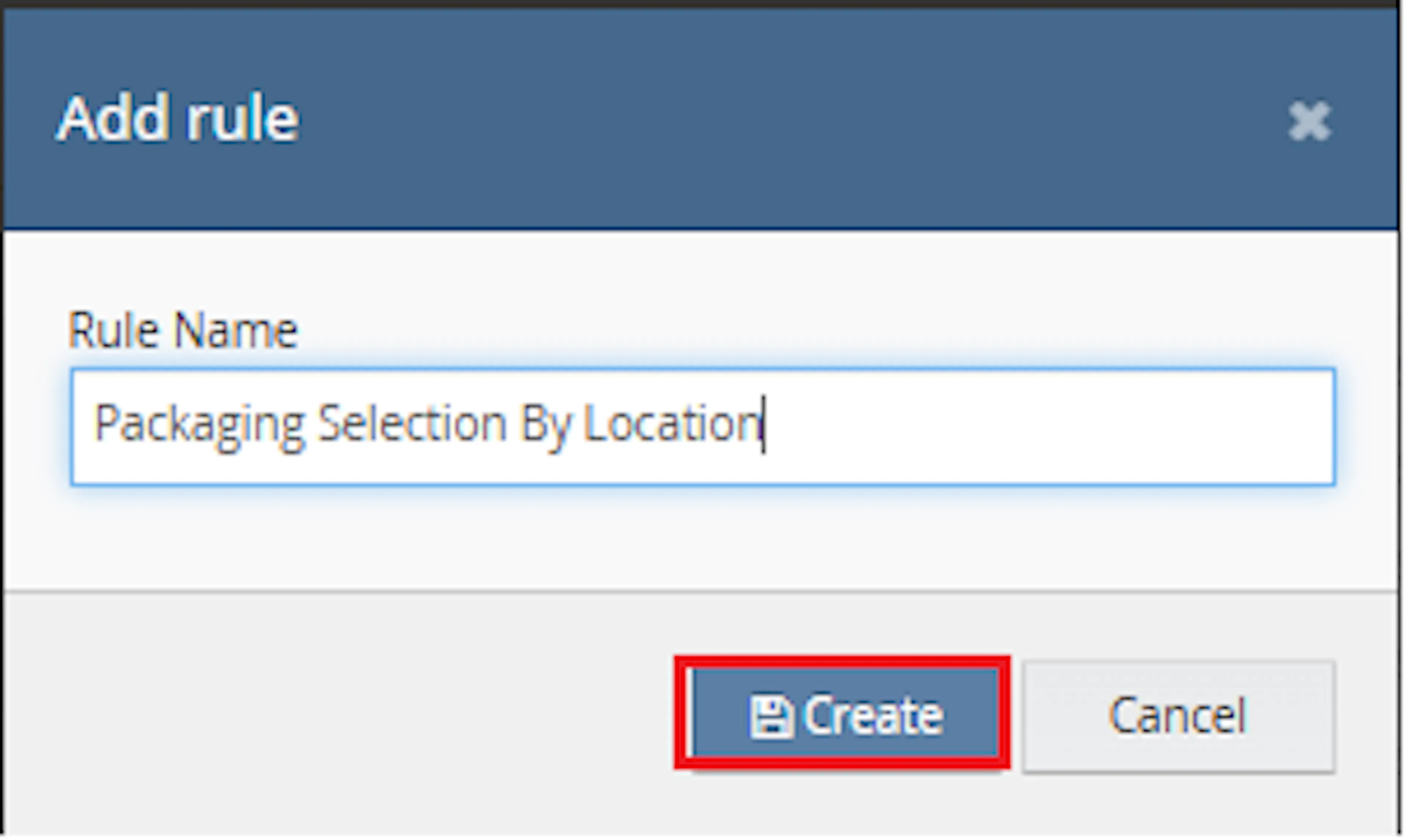
Enter the rule name and click Create.
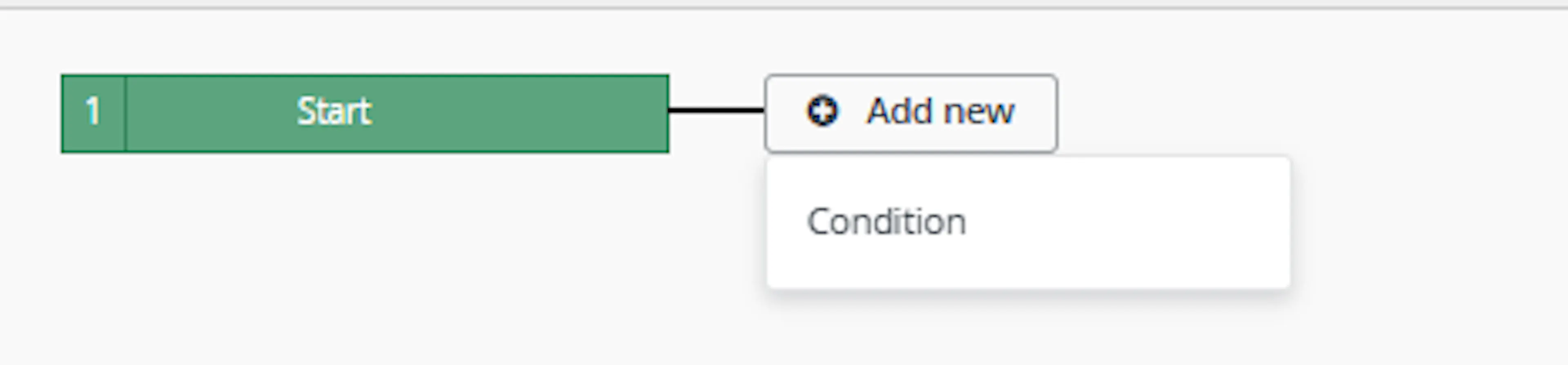
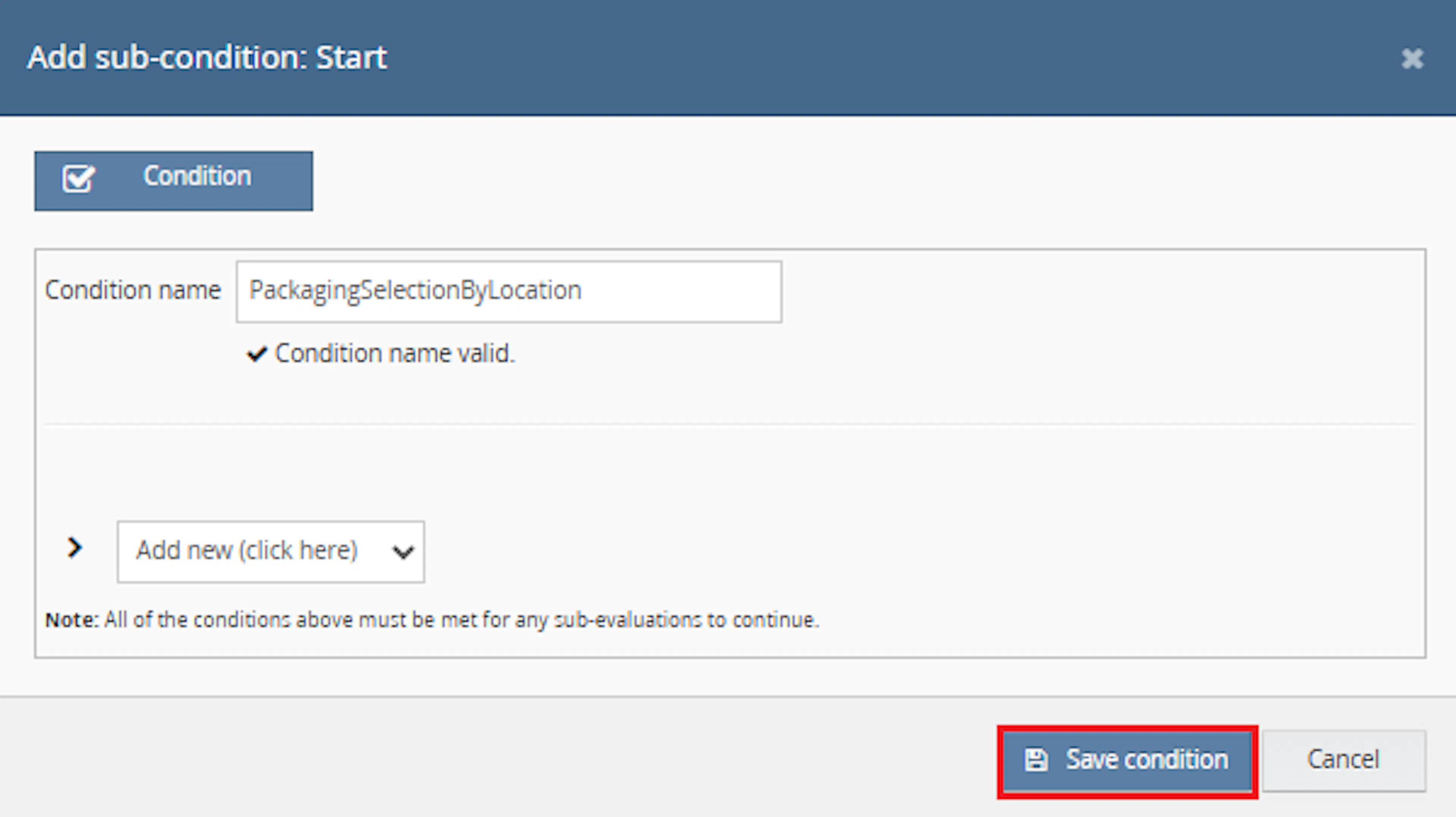
Click Add new, select Condition, set the condition as required, and save it.
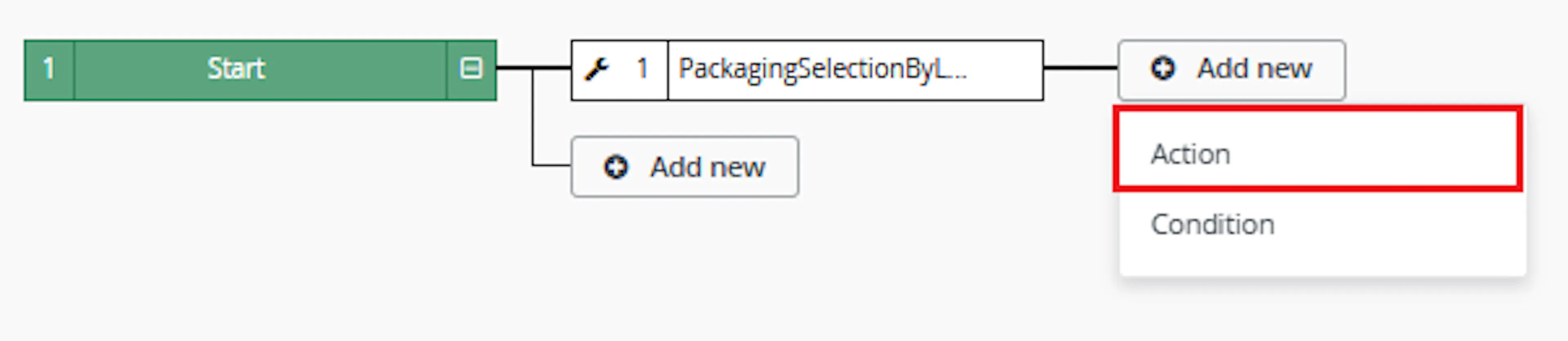
Add the macro action and click Save.
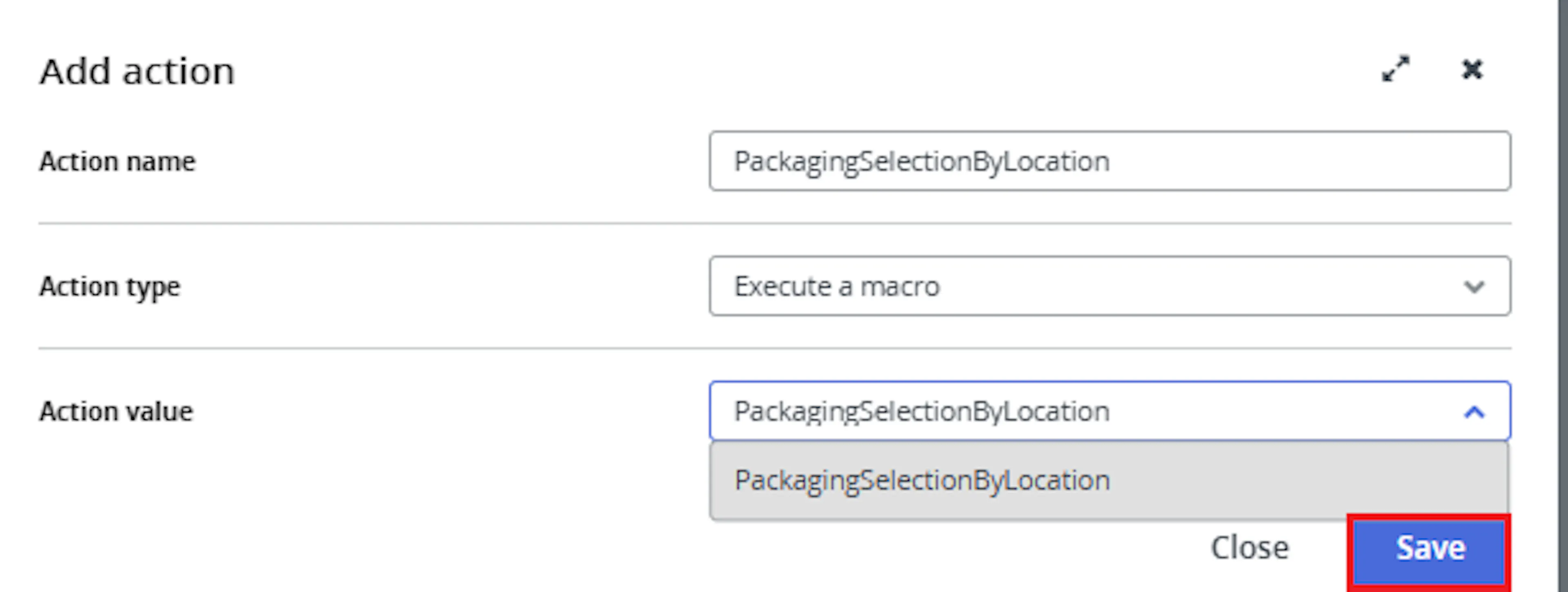
In the Add action window, enter the Action name, for example:
PackagingSelectionByLocation
-
Set Action type to:
Execute a macro -
In Action value, select:
PackagingSelectionByLocation -
Click Save
Note: If the macro is not enabled, it will not appear in the Action value list when setting up the rule.
Review the saved rule setup.
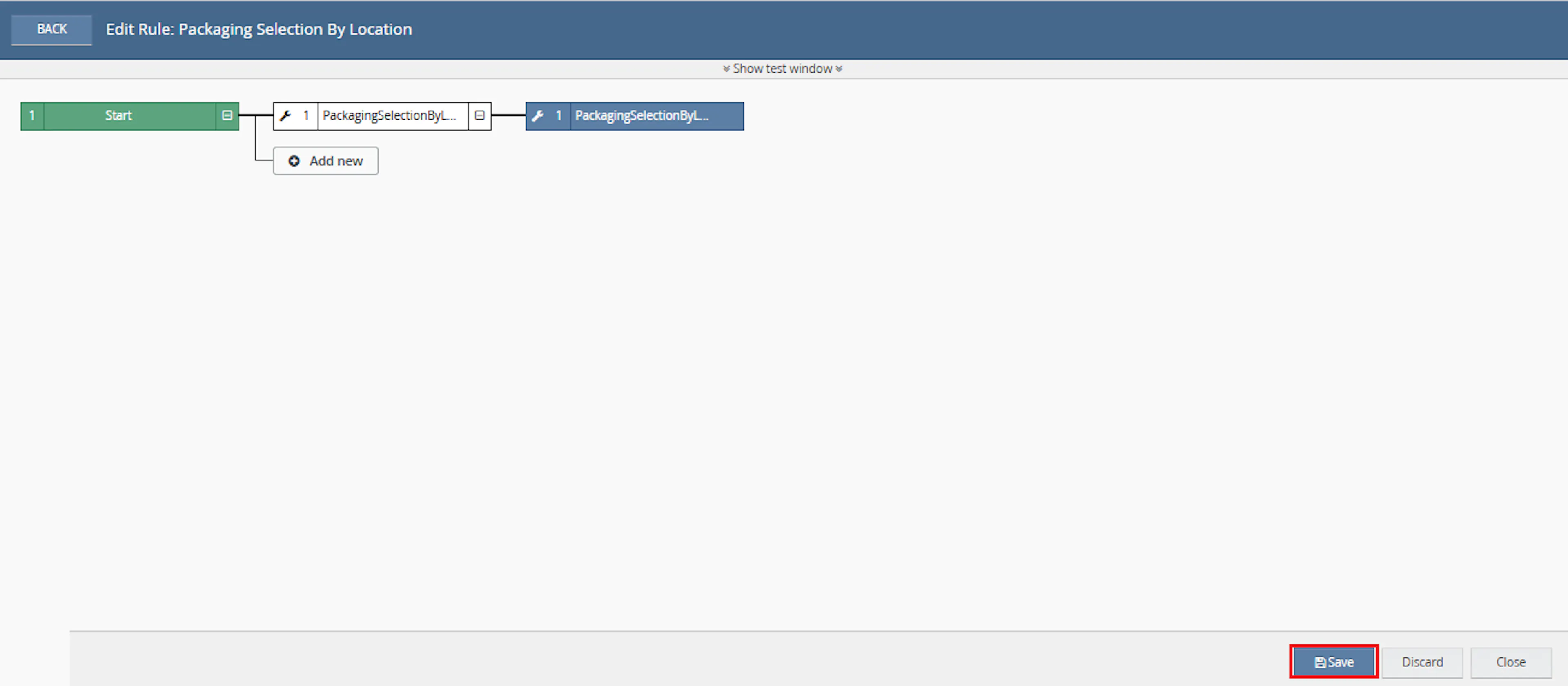
- Verify the condition and action are connected correctly
- Click Save in the bottom-right corner to save the rule
Key Benefits
Incorrect packaging selection can affect shipping calculations, label generation, and fulfilment accuracy. Packaging Selection by Location applies the same location-based packaging rules to every selected order.
Reduce manual packaging checks, improve shipping preparation, and maintain consistent packaging selection across fulfilment locations.
Reduce Manual Packaging Checks
Removes the need to review and select packaging groups manually for every selected order.
Improve Shipping Preparation
Helps ensure packaging details are recalculated before shipping labels or dispatch workflows continue.
Apply Location-Based Rules
Matches each fulfilment location to the appropriate packaging category defined within the macro.
Maintain Packaging Accuracy
Recalculates packaging depth, height, width, and weight using Linnworks packaging tools.
Process Multiple Orders
Updates packaging for multiple selected orders in a single macro execution.
Avoid Incorrect Updates
Applies packaging changes only when both the location rule and matching packaging group are available.
Usage of App
Packaging Selection by Location is triggered through the Linnworks Rule Engine to select and recalculate order packaging automatically.
Execution
Trigger via Rule Engine
Call the PackagingSelectionByLocation macro through the Rule Engine with the required OrderIds. No additional custom parameter values are required.
Outcome
When the macro runs against an order, it:
Reads the selected order
Retrieves the complete Linnworks order details for each supplied order ID.
Identifies the fulfilment location
Uses the order FulfilmentLocationId to find the associated stock location.
Selects a packaging category
Applies the location rules defined within the macro.
Finds the Linnworks packaging group
Matches the selected category to an available packaging group.
Selects the first packaging type
Uses the first packaging type returned for the matching group.
Recalculates packaging details
Calculates the updated package dimensions and total weight.
Updates the Linnworks order
Applies the recalculated packaging information to the selected order.
Input Parameters
Packaging Selection by Location requires the following input:
| Parameter | Required | Description |
|---|---|---|
| OrderIds | Yes | The Linnworks order IDs to process. Supplied automatically through the Rule Engine or selected-order context. |
No additional user-entered parameters are required in Macro Configuration.
The macro relies on the following Linnworks data and setup:
| Data or Configuration | Description |
|---|---|
| FulfilmentLocationId | Identifies the stock location assigned to the order. |
| Stock locations | Used to resolve the fulfilment location name. |
| Packaging groups | Must contain the package categories expected by the macro. |
| Packaging types | The first packaging type in the selected group is used. |
| Location rules | Map fulfilment locations to packaging categories within the macro logic. |
Packaging Location Rules
The documentation identifies the following packaging categories as examples used by the location-selection logic:
| Packaging Category |
|---|
| UK |
| Germany |
| USA |
| Sailfish |
| Canada |
| Australia |
Important: The required packaging groups must exist in Linnworks with names matching the categories expected by the macro.
The precise fulfilment location-to-category mappings are defined within the macro logic rather than entered through Macro Configuration.
Packaging Selection Rules
The macro applies the following processing rules:
| Order or Packaging Condition | Macro Behaviour |
|---|---|
| Fulfilment location matches a defined rule | Selects the corresponding packaging category. |
| Matching packaging group exists | Uses the first packaging type from that group. |
| Packaging group contains a packaging type | Recalculates and updates the order packaging. |
| Fulfilment location has no matching rule | Leaves the order packaging unchanged. |
| Matching packaging group does not exist | Does not perform the packaging recalculation. |
| Matching packaging group has multiple types | Uses the first available packaging type. |
Packaging Values Recalculated
When processing succeeds, the macro recalculates the following packaging details:
| Packaging Value | Description |
|---|---|
| Depth | Recalculated package depth for the order. |
| Height | Recalculated package height for the order. |
| Width | Recalculated package width for the order. |
| Weight | Recalculated total package weight for the order. |
| Packaging Group | The group selected from the fulfilment location rule. |
| Packaging Type | The first type from the selected packaging group. |
Example Scenario
Assume the following packaging groups exist in Linnworks:
UKGermanyUSACanadaAustralia
The selected orders produce the following outcomes:
| Order | Fulfilment Location Result | Macro Outcome |
|---|---|---|
| Order A | Matches the UK location rule | Selects the UK packaging group and recalculates packaging. |
| Order B | Matches the Germany location rule | Selects the Germany packaging group and recalculates packaging. |
| Order C | Matches the USA location rule | Selects the USA packaging group and recalculates packaging. |
| Order D | No location rule matches | No packaging update is applied. |
| Order E | Location matches, but packaging group is missing | No packaging recalculation is applied. |
Best Practices
Configure the required packaging groups and verify fulfilment location names before enabling the macro across a large order volume.
Confirm fulfilment locations
Ensure Linnworks stock location names match the location rules expected by the macro.
Create packaging groups first
Confirm that all required packaging categories exist in Linnworks before running the macro.
Review the first packaging type
The macro uses the first packaging type in each group, so make sure it is suitable as the default.
Use targeted rule conditions
Configure the Rule Engine to process only orders that require location-based packaging selection.
Run before label generation
Trigger the macro before shipping labels are generated so the updated packaging values are available.
Monitor execution logs
Review logs for selected categories, calculated dimensions, packaging weight, missing groups, and errors.
FAQ
How is Packaging Selection by Location triggered?
The macro is triggered through the Linnworks Rule Engine. Matching order IDs are supplied through the OrderIds parameter.
Does the macro require additional configuration parameters?
No. The configuration requires a name and must be enabled, but no additional values are entered.
How does the macro identify the fulfilment location?
It uses the order's FulfilmentLocationId and matches it to the Linnworks stock location list.
How is the packaging group selected?
The fulfilment location is compared against the location rules defined within the macro. The matching rule returns a packaging category.
Where are the location rules configured?
The location-to-packaging mappings are defined within the macro logic.
Which packaging categories are documented?
The source documentation lists UK, Germany, USA, Sailfish, Canada, and Australia.
Must the packaging groups already exist?
Yes. The expected packaging group must exist in Linnworks before the macro can use it.
Which packaging type is selected?
The macro uses the first packaging type available within the matched packaging group.
What packaging information is recalculated?
The macro recalculates depth, height, width, and weight.
What happens when the fulfilment location has no matching rule?
The order packaging is not updated.
What happens when the location matches but the packaging group does not exist?
The packaging recalculation is not applied.
What happens when a packaging group contains multiple packaging types?
The first available packaging type is used.
Can multiple orders be processed in one execution?
Yes. The macro loops through every order ID supplied through OrderIds.
Does the macro update the order shipping service?
The documentation describes packaging-group selection and packaging recalculation. It does not state that the shipping service is changed.
Does the macro create shipping labels?
No label-generation behaviour is described. The macro prepares the packaging details before later shipping workflows.
What should be checked when an order is not updated?
Confirm that the order has a fulfilment location, the location matches a defined rule, and the required packaging group and packaging type exist in Linnworks.
What should be checked when the wrong packaging type is used?
Review the ordering of packaging types within the matched group because the macro uses the first available type.
Summary
Packaging Selection by Location automates packaging-group selection for selected Linnworks orders.
Once connected to the Rule Engine, the macro retrieves the order fulfilment location, maps it to a packaging category, finds the corresponding Linnworks packaging group, selects the first packaging type, recalculates dimensions and weight, and updates the order packaging.
Automatic location matching
Each order's fulfilment location is compared with the location rules defined by the macro.
Packaging group selection
The matching packaging category is used to find the appropriate Linnworks packaging group.
Automatic recalculation
Packaging depth, height, width, and weight are recalculated automatically.
Rule Engine automation
Selected orders are processed automatically through the configured Linnworks rule.
For orders that do not update as expected, review the Rule Engine and macro logs, confirm the fulfilment location mapping, and verify that the required packaging group contains at least one packaging type.