Amazon Customisation
Automatically extract Amazon order customisation details from order XML, validate the Amazon order reference, and add the customisation values as order notes in Linnworks.
Amazon customised orders can contain important buyer-selected personalisation details that need to be visible during fulfilment, picking, packing, or customer service review. When these details are stored inside Amazon XML data or customisation URLs, teams may need to open and inspect order XML manually.
The Amazon Customisation Details Note macro helps make this information easier to access by extracting customisation values from Amazon order XML and adding them directly into Linnworks order notes.
This macro checks each selected order, validates that the Amazon order ID in the XML matches the Linnworks channel reference, retrieves the buyer customisation data, and creates a note containing the SKU, label, and selected input value.
Keep Amazon customisation details visible by automatically copying buyer-selected values into Linnworks order notes.
Configure the Macro
Once the app is installed, you need to create a macro configuration so the system knows which macro to run, when to run it, and which XML fields should be extracted.
This setup can be adjusted anytime based on your operational requirements.
Steps to Configure
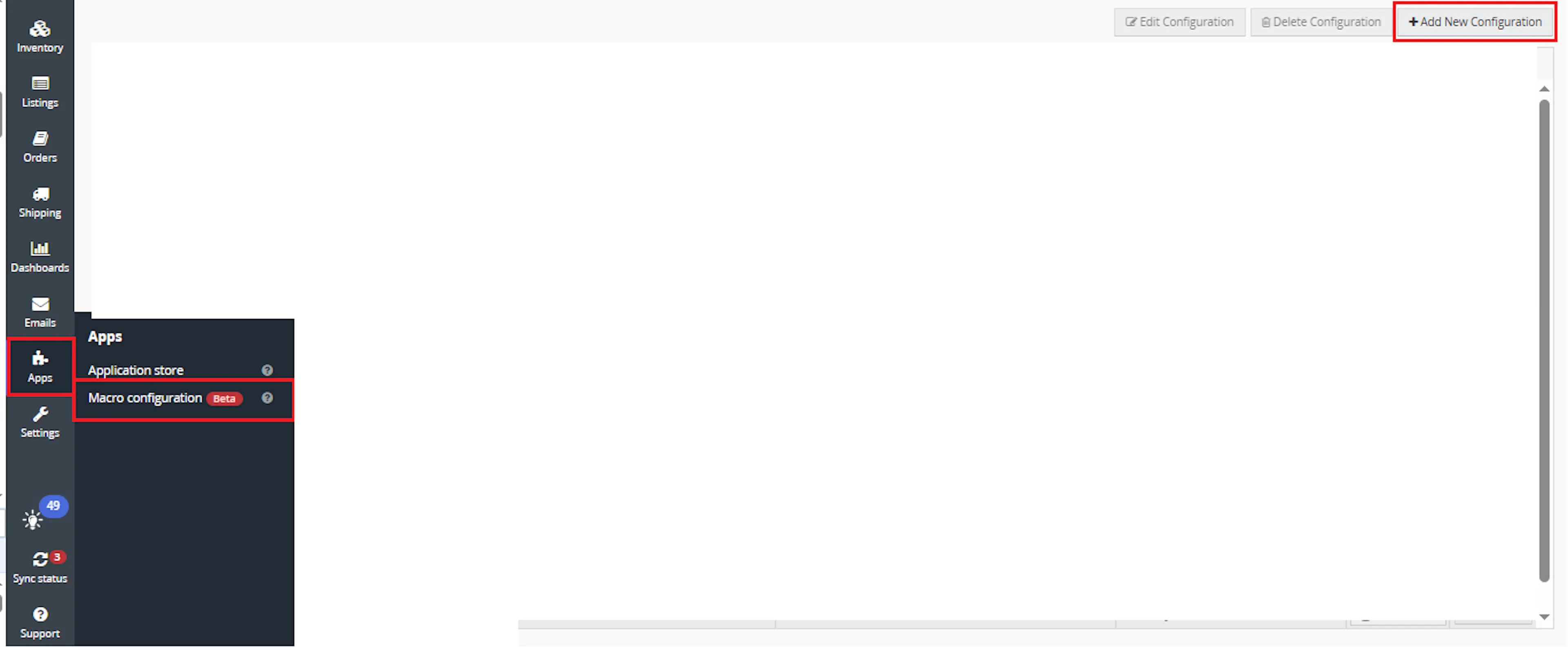
Go to Apps > Macro Configuration and click + Add new configuration.
Select the Amazon Customization macro and click Create Configuration.
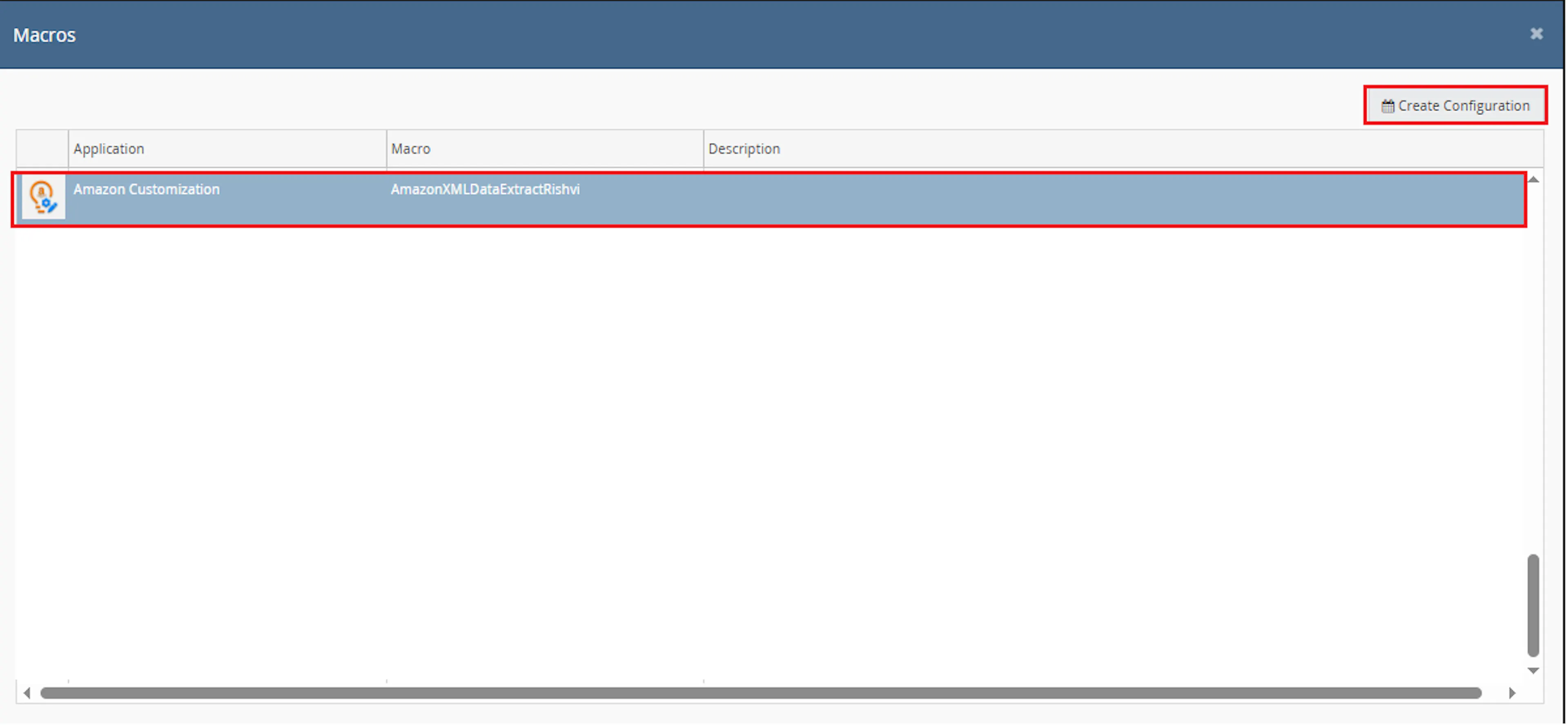
This creates a new configuration where you can define the required parameter values.
In the Macro Configuration screen, add the configuration name and parameter values.
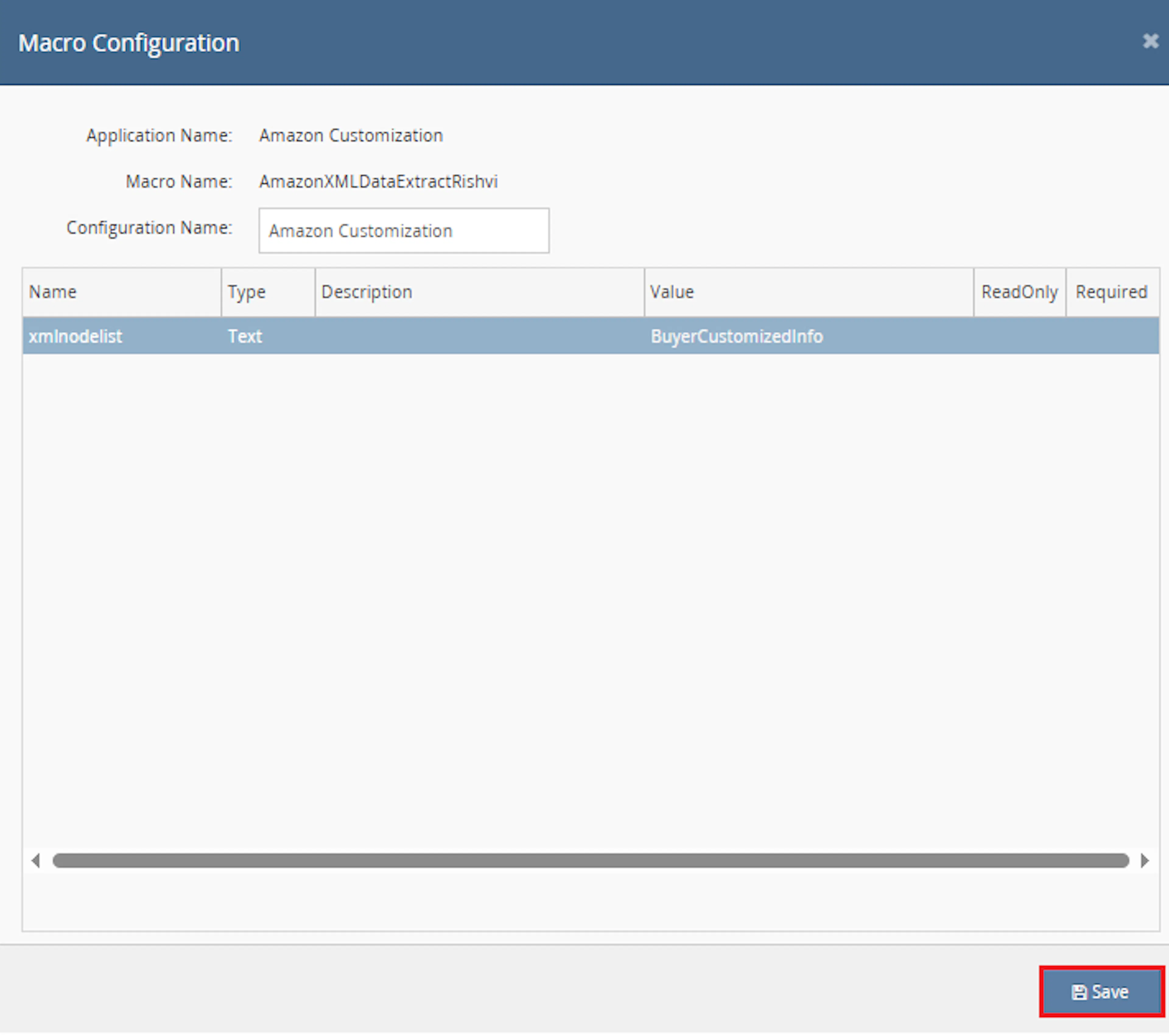
Configure the required parameters, including:
- xmlnodelist
Make sure to enable the macro to continue with the Rule Engine configuration.

Note: If the macro is not enabled, it will not appear in the Action value list when setting up the rule.
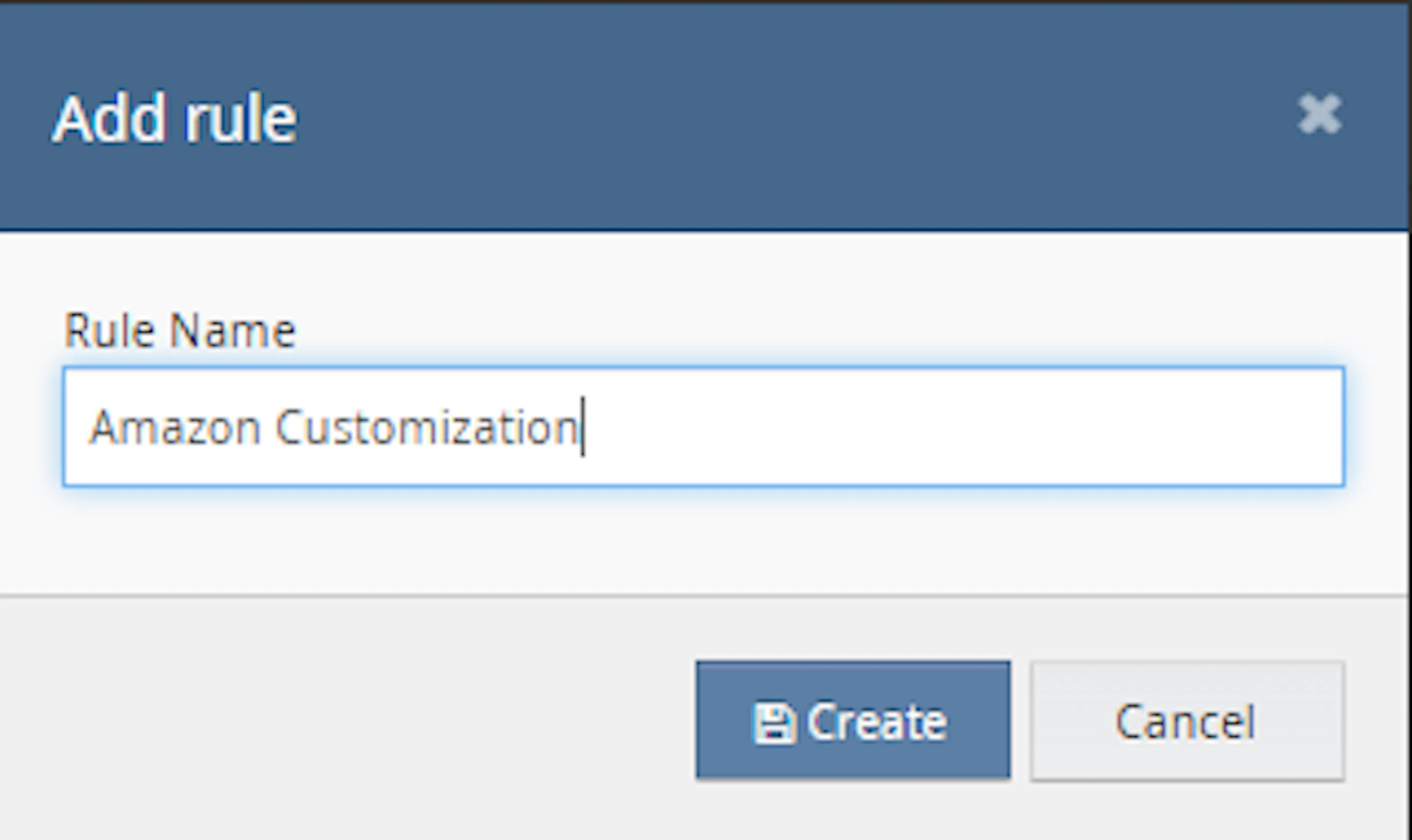
Go to Orders > Rules engine and click + Add new rule.
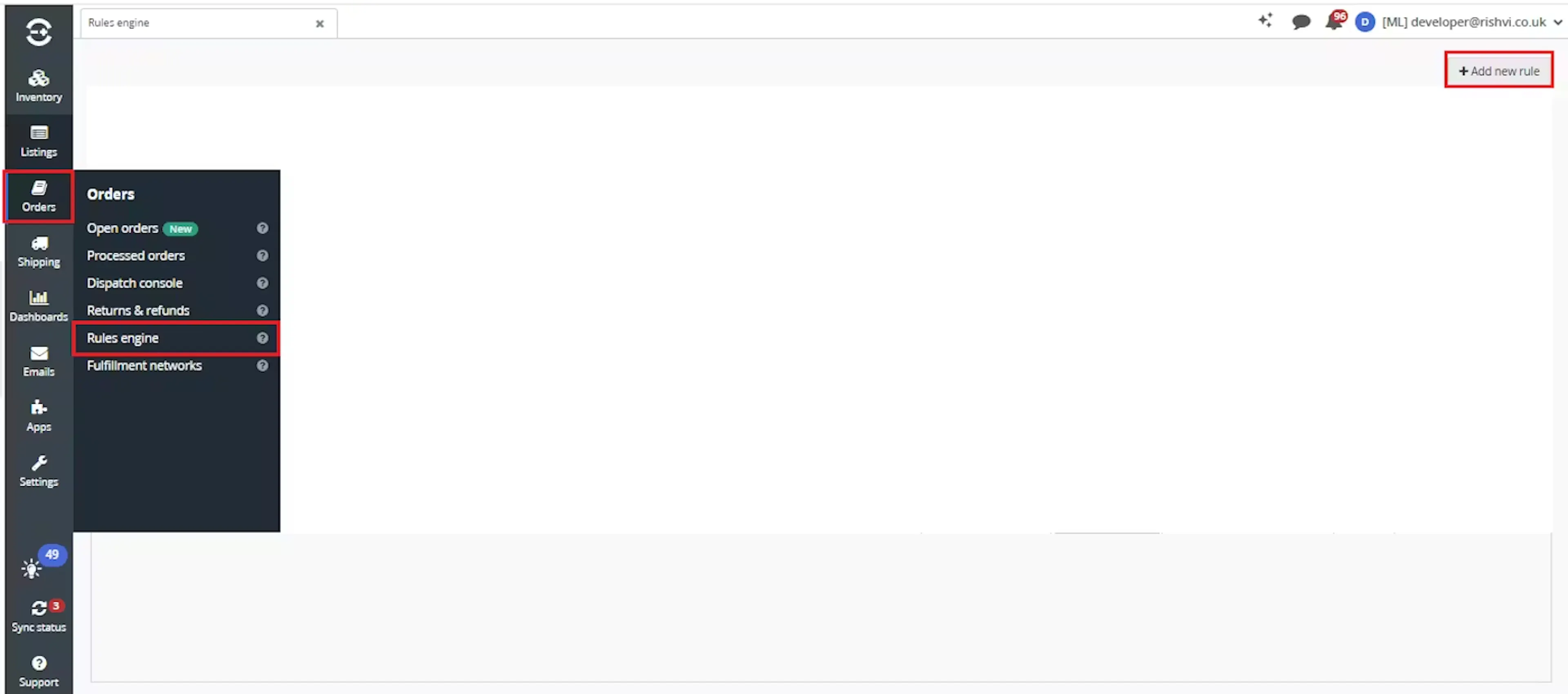
Enter the rule name and click Create.
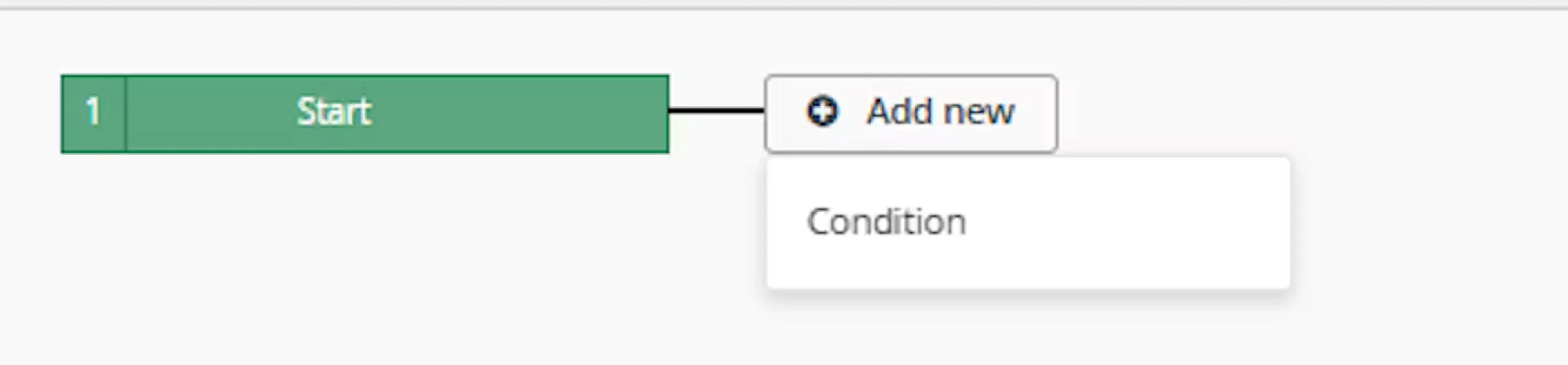
Click Add new, select Condition, set the condition as required, and save it.
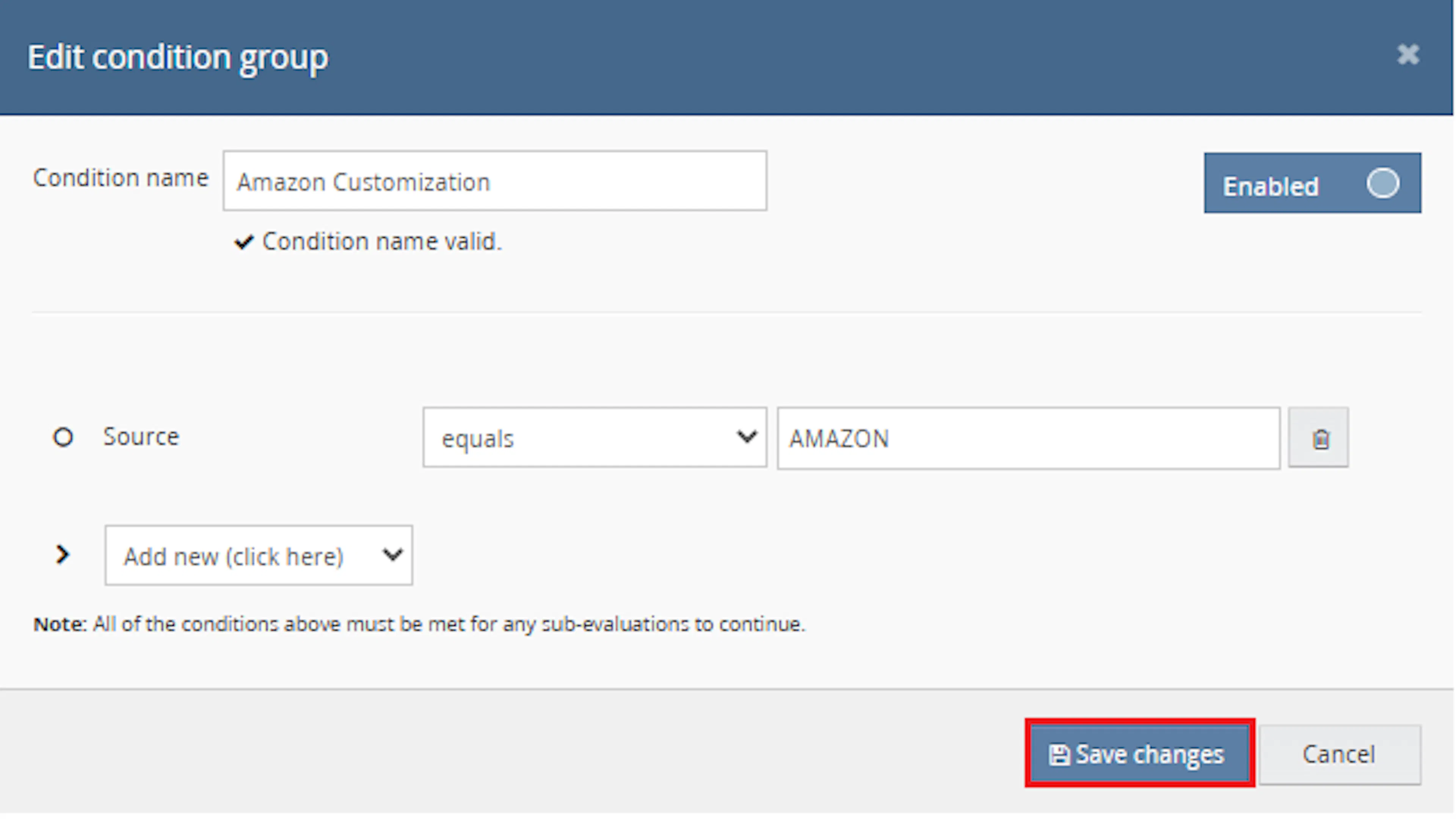
Use conditions that target Amazon orders where buyer customisation details may be present.
Add the macro action and click Save.
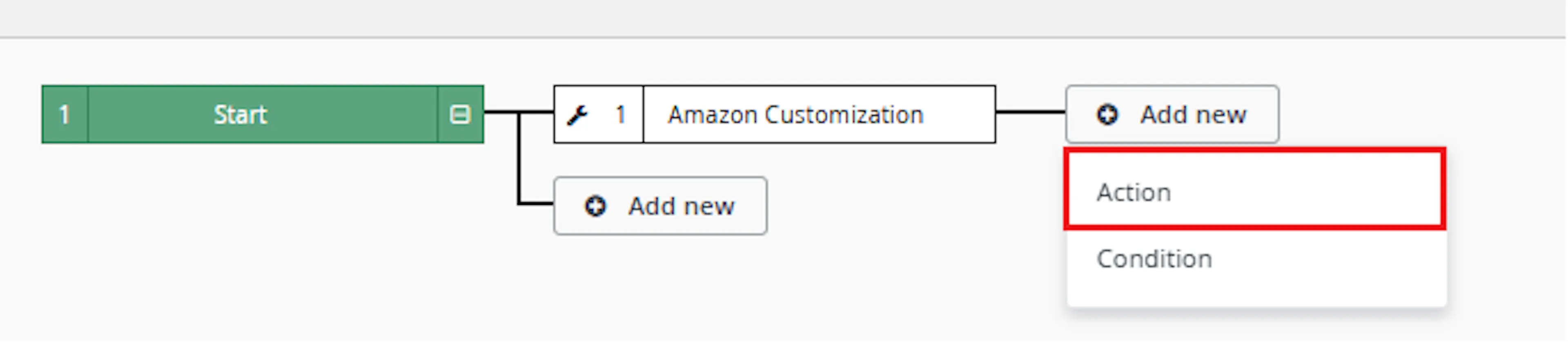
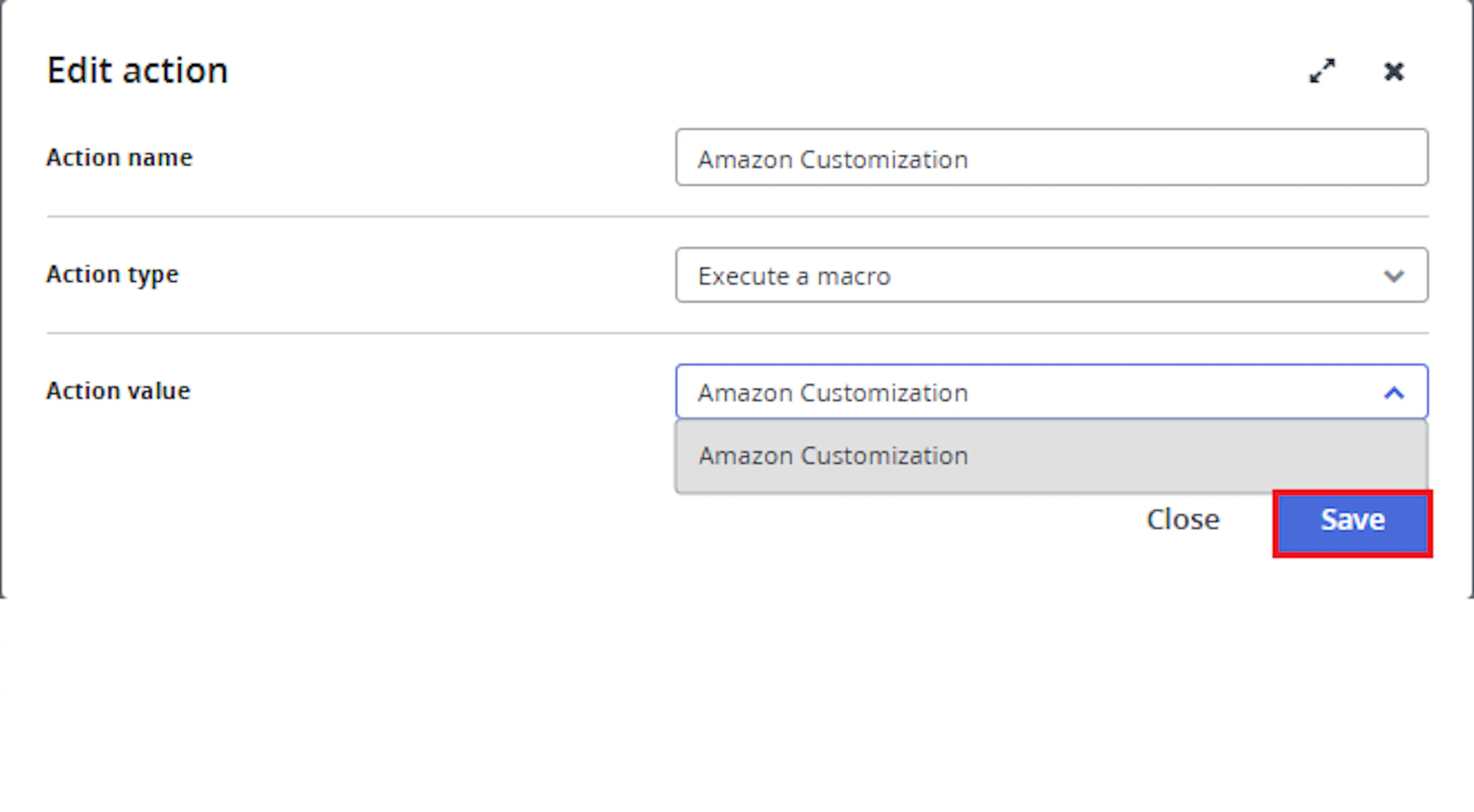
In the Add action window, enter the Action name, for example:
AmazonCustomisationDetailsNote
-
Set Action type to:
Execute a macro -
In Action value, select:
AmazonExtractDetails_new -
Click Save
Note: If the macro is not enabled, it will not appear in the Action value list when setting up the rule.
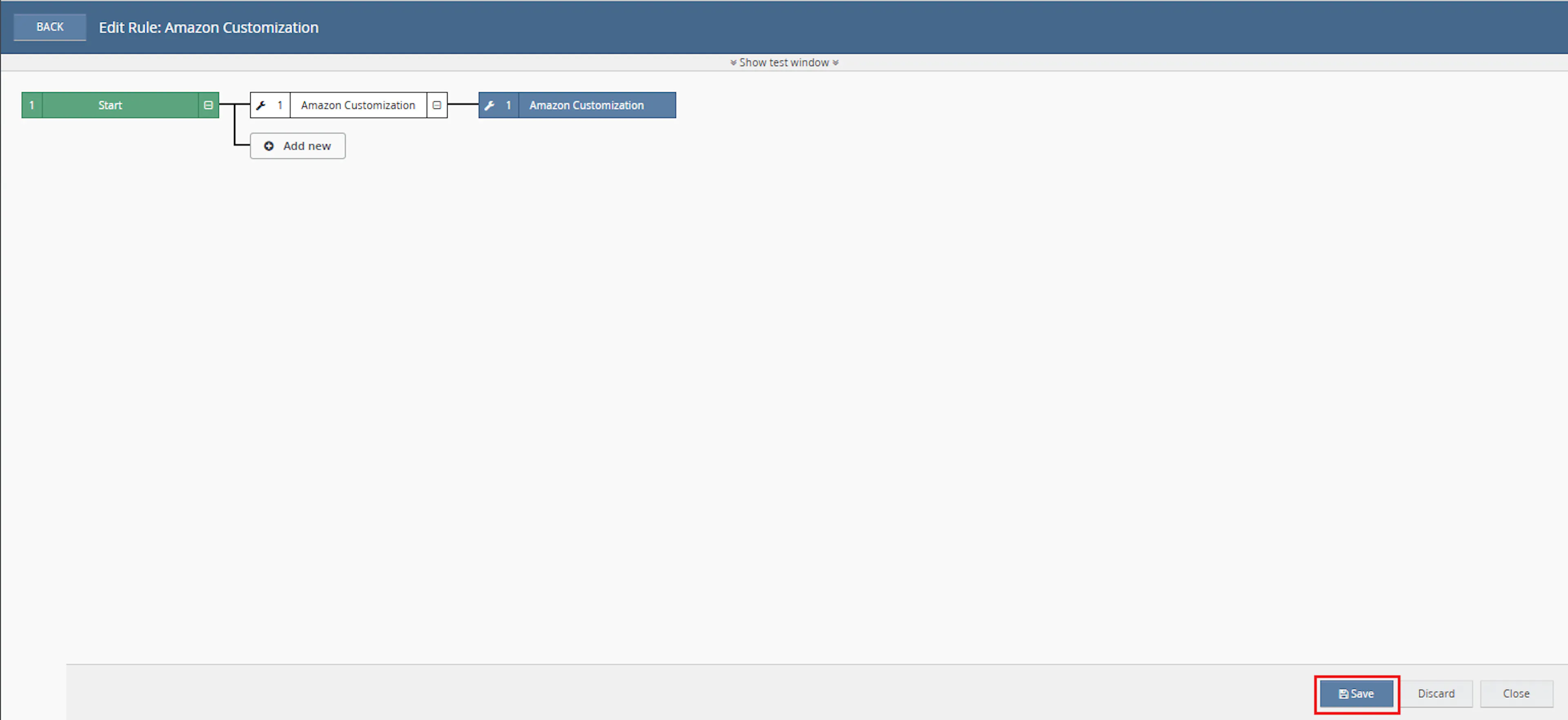
Review the saved rule setup.
-
Verify the condition and action are connected correctly
-
Click Save in the bottom-right corner to save the rule
Amazon customisation details can be important for fulfilment accuracy, especially when products require buyer-selected names, text, colours, options, or other personalisation values. This macro helps reduce manual checks by extracting the required values and adding them to the order notes.
Reduce Manual XML Checks
Eliminates the need to manually inspect Amazon order XML to find customisation details.
Improve Customisation Visibility
Adds buyer customisation details into order notes so they are easier to view during fulfilment.
Validate Amazon Order Match
Confirms the Amazon order ID in the XML matches the Linnworks channel reference before creating notes.
Support Accurate Fulfilment
Helps warehouse and packing teams see SKU-specific personalisation details directly on the order.
Avoid Duplicate Processing
Skips orders that already contain a note created by the same macro.
Store Despatch Date
Adds the order despatch date as an extended property when the expected despatch-date property is not already available.
How It Works
The macro checks selected orders, validates the Amazon XML order reference, extracts customisation data, and adds the result as an order note.
Step 1
The macro starts execution and writes Macro Start - Orders to Process to the log.
Step 2
It loops through each order ID provided in the OrderIds parameter.
Step 3
For each order, the macro retrieves the order details using the Linnworks Orders API.
Step 4
The macro checks whether a despatch-date extended property name exists. If it does not, it adds a Despatch Date extended property using the order DespatchByDate value.
Step 5
The macro retrieves existing order notes and checks whether the order was already processed by Add Note From AmazonXMLDataExtract macro.
Step 6
If the order was already processed, the macro skips that order.
Step 7
The macro retrieves the order XML using the Linnworks Orders API.
Step 8
It reads the Amazon order ID from the XML path /OrderWithItems/Order/AmazonOrderId and compares it with the Linnworks channel reference.
Step 9
If the Amazon XML order ID does not match the Linnworks channel reference, the macro skips note creation for that order.
Step 10
If the order reference matches, the macro reads the buyer customisation URL from BuyerCustomizedInfo/CustomizedURL.
Step 11
The macro sends the customisation URL to the external XML extraction endpoint and retrieves the customisation XML data.
Step 12
The macro uses the configured xmlnodelist parameter to select customisation nodes from the returned XML.
Step 13
For each selected node, the macro extracts the label and the input value. The input value can come from inputValue, text, or optionValue.
Step 14
The macro creates note lines in the format SKU : label - input value.
Step 15
If note content was created and the same note does not already exist, the macro adds the note to the order.
Step 16
The macro logs any errors and writes Macro Finished when execution ends.
Usage of App
This macro is designed to update selected orders automatically through the Rule Engine. It is useful when Amazon personalised or customised order data needs to be visible in Linnworks order notes.
OrderIds
Defines the Linnworks order IDs that should be processed. Only these selected orders are checked and updated.
xmlnodelist
Defines the comma-separated XML node paths used to select customisation nodes from the returned customisation XML.
dynamicFields
Defines a comma-separated list of field names that the macro reads from each selected XML node.
AmazonOrderId
The macro reads this value from /OrderWithItems/Order/AmazonOrderId and compares it with the Linnworks channel reference before processing notes.
CustomizedURL
The macro reads this value from each Amazon order item and sends it to the external XML extraction endpoint.
Order Note Format
Customisation details are added to the order note in the format SKU : label - input value.
Despatch Date Extended Property
The macro adds a Despatch Date extended property using the order DespatchByDate value when the expected property name is not found.
Execution Logging
The macro records processing details, skipped orders, XML parsing issues, API failures, and completion status using the macro logger.
Key Points to Remember
-
The macro processes only the order IDs provided in OrderIds
-
The macro is intended to run from the Rule Engine
-
The macro retrieves order XML from Linnworks
-
The Amazon XML order ID must match the Linnworks channel reference
-
Orders with mismatched references are skipped
-
Orders already processed by Add Note From AmazonXMLDataExtract macro are skipped
-
The macro reads customisation URLs from BuyerCustomizedInfo/CustomizedURL
-
The macro uses an external API endpoint to fetch the customisation XML
-
The note format is SKU : label - input value
-
The input value can come from inputValue, text, or optionValue
-
Notes are created with Internal set to false
-
The note creator is set as Add Note From AmazonXMLDataExtract macro
-
The macro checks whether the same note already exists before adding it
-
XML parsing failures are logged and do not stop the full macro run
Once the macro is running, it helps ensure Amazon customisation details are visible directly in Linnworks order notes.
What You Can Expect
-
Amazon customisation details are added to order notes
Matching customisation data is extracted and saved as a non-internal order note. -
SKU-specific details are included
Each note line includes the SKU followed by the customisation label and selected value. -
Mismatched XML data is skipped
If the Amazon order ID in the XML does not match the Linnworks channel reference, the macro skips note creation. -
Previously processed orders are skipped
Orders with an existing note created by this macro are not processed again. -
Despatch date may be stored as an extended property
The macro can add a Despatch Date extended property based on the order despatch date. -
Execution is logged
The macro records when it starts, processes orders, encounters issues, and finishes.
Overall Impact
This macro improves visibility of Amazon personalisation data, reduces manual XML checks, and helps fulfilment teams process customised orders more accurately.
What To Do After the Macro Runs
After the macro has completed, review the affected orders to confirm that Amazon customisation details have been added to the order notes.
Steps to Follow
Step 1
Open Linnworks and locate the Amazon orders processed by the rule.
Step 2
Open an affected order and review the order notes.
Step 3
Confirm that the note contains lines in the format SKU : label - input value.
Step 4
Review the note details against the customised product requirements.
Step 5
Continue with normal picking, packing, fulfilment, or customer service processing.
Why This Matters
Keeping Amazon customisation details visible helps:
-
Reduce manual order XML checks
-
Improve fulfilment accuracy for personalised items
-
Make buyer-selected customisation values easier to find
-
Prevent missed personalisation details
-
Support picking, packing, and customer service workflows
Best Practices
To get the most value from this macro, configure rule conditions and XML parameters carefully.
Recommended Guidelines
-
Use clear Amazon order conditions
Configure the Rule Engine so the macro runs only for Amazon orders where customisation details may exist. -
Configure xmlnodelist carefully
Make sure the XML node paths match the structure returned by the customisation XML. -
Use comma-separated values
Enter multiple XML node paths or dynamic fields as comma-separated values. -
Review sample orders first
Test the macro on a small number of customised Amazon orders before wider use. -
Check macro logs
Review logs for skipped orders, XML reference mismatches, parsing failures, or external API errors. -
Avoid repeated processing
The macro skips orders already processed by the configured creator name, helping prevent duplicate note creation.
Troubleshooting
No note was created
Confirm that the order contains Amazon order XML and that the XML includes a valid CustomizedURL value.
Order was skipped
Check whether the Amazon order ID in the XML matches the Linnworks channel reference.
Macro is not visible in the Rule Engine
Confirm that the macro configuration has been created and enabled in Apps > Macro Configuration.
Customisation values are missing
Check the xmlnodelist parameter and confirm that the selected nodes contain label, inputValue, text, or optionValue values.
External API returned no data
Review the macro logs for the customisation URL and API failure message.
Duplicate note concern
The macro checks whether the same note already exists and also skips orders already processed by the macro creator name.
Summary
The Amazon Customisation Details Note macro checks selected Linnworks orders, validates the Amazon XML order reference, extracts buyer customisation data from Amazon customisation XML, and adds the details to the order notes.
This helps teams reduce manual checks, improve personalisation accuracy, and keep Amazon customised order details visible throughout the fulfilment process.